>>
Technology>>
Cloud>>
How to Reduce Deployment Failu...How to Reduce Deployment Failures in DevOps Pipelines?
The Silicon Review
29 December, 2025
Deployments are supposed to be straightforward, but anyone who has worked in DevOps knows that’s rarely the case. In fact, the 2023 DORA State of DevOps Report shows that even high-performing teams experience deployment issues, with nearly a third of software releases requiring remediation on the first attempt. That means delayed releases, frustrated developers, and sometimes unhappy customers.
The truth is, deployment failures are not just due to some technical errors. They happen because the systems are complex, teams are working in different environments, and minor issues easily turn into bigger problems. Additionally, there is a conflict of interest: developers want smooth pipelines, operations teams want predictable releases, and leadership wants fast and reliable delivery.
So, What to do?
The answer is: Understand why deployment failures in DevOps happen.
In this article, we’ll break down why deployments fail and share practical ways to reduce those failures. The tips here are based on real experience and focus on making pipelines simpler, more predictable, and easier to manage. By the end, you’ll have a clearer view of how to keep your deployments running smoothly and avoid unnecessary headaches.
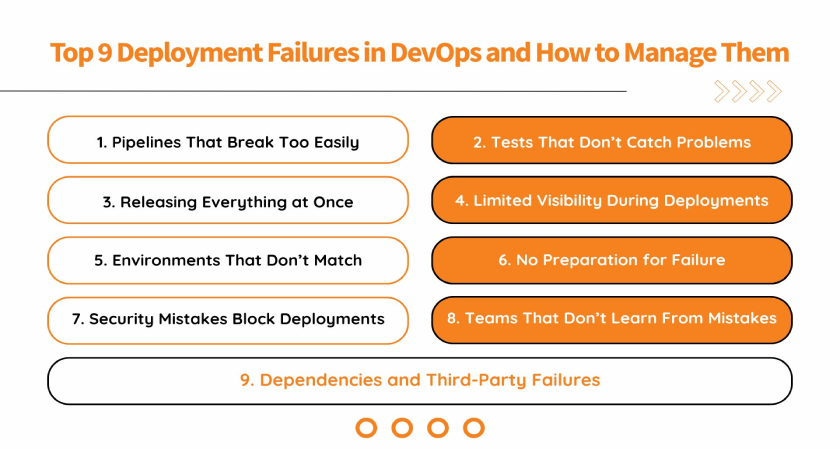
Top 9 Deployment Failures in DevOps and How to Manage Them
Here’s a detailed breakdown of the nine key deployment failures teams can face in DevOps, and how to manage them.
1. Pipelines That Break Too Easily
The foundation of any deployment is a well-structured CI/CD pipeline. Failures often happen when pipelines are overly complex, inconsistent, or lack proper checkpoints.
To make a pipeline reliable, it should be modular (a pipeline broken down into separate stages), with distinct stages for building, testing, and deploying. Why? Modular pipelines allow teams to identify issues quickly, prevent failures from spreading and getting bigger, and maintain consistency across multiple projects. Using the same configuration across development, staging, and production, and setting up automated alerts for failed builds will also make sure that the problems are caught before they affect live systems.
2. Tests That Don’t Catch Problems
Manual testing can take up more time and still pose a risk of human error. But by implementing automated testing in DevOps at multiple levels of the lifecycle, it can help achieve deployment reliability.
Unit tests verify individual components, integration tests confirm that services work together, and end-to-end tests simulate real user interactions. Integrating automated testing into the CI/CD process ensures that code changes are validated continuously, preventing faulty code from reaching production. Continuous monitoring of test results and enforcing coverage thresholds further strengthens the reliability of deployments.
3. Releasing Everything at Once
Releasing the whole code at once can actually get very risky, as if there are any errors or issues, you will have to work on the entire code again, which can disrupt the whole delivery process. Instead, what can be done here is implementing progressive deployment strategies, such as blue-green or canary deployments, which allow teams to release changes gradually and monitor their impact.
So how do these strategies work? Blue-green deployments maintain two production environments. One of them serves live traffic while the other one is prepared with the new version. Traffic is switched only after verification, minimizing disruption. Canary deployments release updates to a small subset of users first. If issues are detected, the deployment can be rolled back or paused without affecting the entire user base.
4. Limited Visibility During Deployments
Visibility is important. You will never get to know the deployment failures in your DevOps pipelines until they reach your end users. The reason: your teams lack comprehensive monitoring and do not have a proper setup in place where they can see what’s wrong and where.
Here, teams can integrate DevOps tools for monitoring, such as Prometheus, Grafana, or Datadog, into their pipelines to track logs, metrics, and alerts in real time. Maintaining observability helps detect issues quickly, provides context for failures, and supports proactive problem resolution.
5. Environments That Don’t Match
Inconsistent environments are a major source of deployment failures. When development, staging, and production environments behave differently, even minor changes can create major issues.
Here, Infrastructure as Code (IaC) tools like Terraform, Ansible, and CloudFormation can help by allowing teams to define infrastructure declaratively, ensuring consistency across environments. Also, using version control for all scripts, configuration files, and dependencies ensures reproducibility and simplifies rollback when issues occur. This way, maintaining consistent infrastructure helps reduce errors caused by manual configuration or drift.
6. No Preparation for Failure
No matter how perfect your pipelines are, you can still face a failure with deployments. But if you stay prepared and have a rollback and recovery plan in place, then you can minimize the impact and downtime resulting from the failures.
So, what’s the solution? Maintain versioned releases and automated backups to let your teams restore previous states quickly. Have clear documentation of recovery procedures in place so that everyone knows exactly how to respond when something goes wrong. Also, if you incorporate rollback steps directly into deployment pipelines, it will act as an additional layer of safety, making deployments less stressful and more controlled.
7. Security Mistakes That Block Deployments
Another major reason for deployment failures in DevOps is security misconfigurations. Even a small mistake, like a missing permission or an outdated library, can stop a deployment or force an urgent rollback.
To solve this, you should integrate DevSecOps practices into pipelines to catch the misconfigurations before they reach production. These practices cover Automated security scanning, vulnerability management, and compliance checks, which should run as part of the CI/CD process. Further, using tools like Snyk, Trivy, or Prisma Cloud can help identify risks early, preventing deployments from being blocked by security problems and reducing the chances of emergency patches later.
8. Teams That Don’t Learn From Mistakes
Deployment failures rarely have a single cause. More often, they happen because either the processes are not clear, or the responsibilities overlap, or maybe there is a lack of proper communication and collaboration among the internal teams.
These factors not only cause deployment failures in DevOps, but they also often lead to other major problems with DevOps. Many clients share the same problem when they reach out to a DevOps consulting services provider, and here’s what these experts advise:
- Foster a culture of continuous learning: Encourage teams to review failures openly, share lessons learned, and experiment with improvements without fear of blame. Learning from mistakes should be standard, not optional.
- Run structured, blameless post-mortems: After a failure, teams should analyze what went wrong, why it happened, and how to prevent it next time. A blameless approach ensures people feel safe to share the truth, which is critical for meaningful improvements.
- Regularly review pipeline and process configurations: Routine audits help identify gaps, reduce errors, and maintain consistency across deployments.
9. Dependencies and Third-Party Failures
Today, many modern applications depend on microservices and external integrations. DevOps deployment failures often happen when updates are not coordinated, versions don’t match, or third-party services are unavailable.
Many teams overlook these dependencies until they run into a deployment failure. To prevent this, it’s important to have clear versioning policies and automated checks for dependencies. Teams can even set up staging environments that closely mirror production to catch issues early before they cause any actual impact. Also, keep a check on third-party services and have fallback strategies in place to ensure that problems don’t block your deployments.
Conclusion
Facing deployment failures in DevOps is something you can not avoid, but you sure can prevent letting it become a regular problem. By focusing on pipeline reliability, automation, visibility, consistency, and process improvement, organizations can reduce these failures and improve release confidence.
For companies that need expert help to stabilize their delivery pipelines and reduce the risk of these failures, partnering with a DevOps managed service provider can be of great help. Their team of experts can help implement best practices, optimize CI/CD workflows, and ensure that deployments are predictable and safe.
MOST VIEWED ARTICLES
RECOMMENDED NEWS








TOP NEWS
YOU MAY ALSO LIKE




_2025-12-15_12-44-58.webp)


_2025-11-17_06-38-14.webp)

 (1)_2025-10-21_13-35-14.webp)