>>
Technology>>
Software>>
What Is the Best WhatsApp Live...What Is the Best WhatsApp Live Chat Widget for Your Website? 6 Tools Compared (2026)

TLDR: The best WhatsApp live chat widget depends on whether you want a button that opens WhatsApp or an agent that finishes the job. SleekFlow is the strongest overall pick for SaaS and business websites that want the widget to answer questions, qualify the visitor and book the call, and to follow up on WhatsApp if they leave before converting. Joinchat is the best free option for WordPress, Elfsight is the fastest embed on any site builder, and Tidio suits teams that want a full live-chat suite with WhatsApp as one channel among several.
You worked hard for that visitor. They read your landing page, they have exactly one question ("does this work with Stripe?", "is there a free tier?") and your options for answering it are a contact form they'll never fill in or a live chat that only works if someone's at a desk. So they leave, and the tab closes on a deal you never knew you had.
A WhatsApp chat widget changes this completely. The conversation moves to an app the visitor already has open on their phone, tied to a real identity rather than an anonymous session, which means it can continue after your website can't.
A WhatsApp live chat widget is a floating chat element on your website that connects visitors to your business on WhatsApp. They come in two species: click-to-chat buttons that simply deep-link into the WhatsApp app with a pre-filled message, and full widgets that run automation or AI on the site itself, then carry the thread into WhatsApp. The gap between the two is a lot bigger than people might expect at first.
Comparison at a Glance
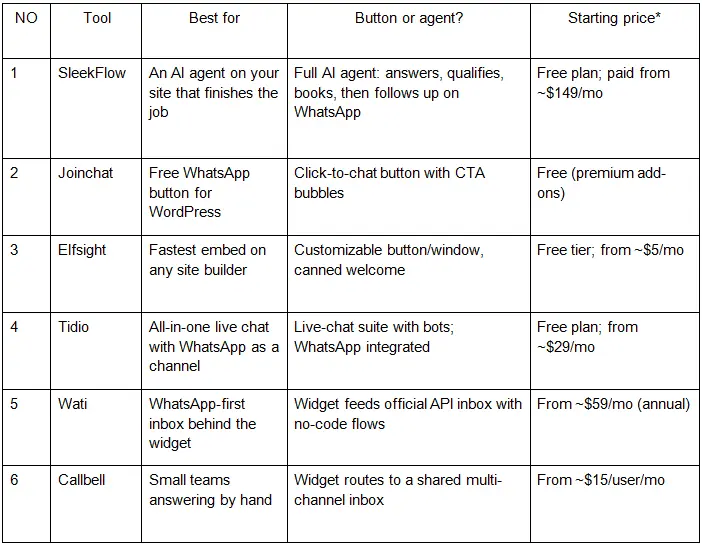
*Pricing summarized from vendor pages and third-party reviews as of August 2026; confirm current rates before buying. Meta's per-message WhatsApp fees apply wherever the official API is used.
Why a WhatsApp Widget Beats a Contact Form
WhatsApp has more than two billion users, and for a large share of the world it's simply where conversations happen. A form submission is a ticket; a WhatsApp message is a thread with a person's actual number attached, read within minutes rather than days.
The durable identity is the underrated part. Website live chat dies with the session: visitor closes the tab, conversation gone, lead gone. A WhatsApp thread survives the tab, survives the commute, and can be picked back up tomorrow by either side. For founders whose traffic is mostly mobile, it also means visitors reply with their thumbs in an app they already trust, instead of typing into a strange chat window.
How We Evaluated These Tools
We assessed each option against six criteria: what actually happens after the click (a deep link into WhatsApp, or automation on the site), the depth of AI and automation behind the widget, whether it runs on the official WhatsApp Business API or a personal number, how the handover to humans works, how easily it embeds on modern site builders, and pricing. Assessments draw on vendor documentation, published pricing and verified user reviews; where a figure comes from a vendor's own customers, we say so and you should treat it as indicative.
1. SleekFlow: Best Overall, an AI Agent Behind the Widget

Best for: SaaS, e-commerce and service websites where a visitor's question is a buying signal, and "we'll get back to you" is where deals go to die.
SleekFlow is an omnichannel AI suite trusted by 7,000+ brands in 70 countries, rated 4.6 on G2 across roughly 200 reviews and a winner of G2's 2024 Best Software Award in Customer Service. It treats the website widget not as a shortcut into WhatsApp but as a front door to AgentFlow, SleekFlow's AI agent platform, where non-technical teams build agents from three ingredients: knowledge, instructions and actions.
How it works: A visitor asks the widget a question. The agent answers from a knowledge base built on your actual docs, pricing and FAQs, qualifies what they need, and then acts inside the conversation: booking the demo, sending a payment link, updating the record in your CRM. Shopify, HubSpot and Salesforce connect without code, so the agent can look up an order or a plan as easily as it answers a question.
The signature move is what happens when the visitor leaves. If they close the tab mid-conversation, the same agent follows up on their phone via WhatsApp. The enquiry survives the session instead of dying with it. Website chat, WhatsApp, Instagram, email and calls then land in one inbox tied to contact profiles, so you see the whole journey from first widget question to closed deal.
Standout features:
-
Conversations that outlive the tab: the widget-to-WhatsApp handoff turns your bounce rate into a follow-up list
-
Controllable AI: a self-healing knowledge base flags its own gaps for a human to approve, and every reply shows its source and reasoning rather than operating as a black box
-
Official Meta Verified Partner and a WhatsApp BSP at Select Tier, the top partner rank, bringing green-tick verification, higher messaging limits and low ban risk
-
Proof it scales the answering: EV charging network JomCharge replies to customers 95%+ faster running on SleekFlow
-
CX Intelligence, an analyst agent that reads every conversation and reports what visitors keep asking: free product roadmap and landing page copy research
-
SOC 2 Type II audited and GDPR compliant, with role-based access for growing teams
Limitations: This is a platform, not a plugin. If all you want is a button that opens WhatsApp, Joinchat or Elfsight will have you live in five minutes for a fraction of the cost. SleekFlow's widget earns its keep once it's connected to your knowledge and systems, an afternoon's setup rather than a minute's.
Pricing: Free plan available; paid plans from ~$149/month (Pro, billed annually; ~$199 monthly), Premium from ~$349/month, plus Meta's per-message fees.
2. Joinchat: Best Free Button for WordPress

Best for: WordPress sites that want a WhatsApp presence today, for free.
Joinchat adds a floating WhatsApp button with attention-grabbing CTA bubbles and a pre-filled opening message, with per-page targeting so the button can say different things on pricing versus blog pages.
Limitations: It's a door, not a desk. After the click, it's you answering on your phone. WordPress only.
Pricing: Free core plugin; paid add-ons available.
3. Elfsight: Fastest Embed on Any Site Builder

Best for: Sites on no-code builders (Unicorn Platform, Webflow, Framer, Squarespace) that want a polished widget from a copy-paste embed.
Elfsight's WhatsApp Chat widget is a configurable button-and-window with a welcome message, multiple team numbers, and styling controls, dropped in with one snippet.
Limitations: At heart it's still a deep link with better clothes, the free tier carries branding, and it's a recurring fee for a button.
Pricing: Free tier; paid from ~$5/month.
4. Tidio: Best All-in-One Live Chat Suite
Best for: Teams that want site-native live chat, chatbots and an AI answerer, with WhatsApp as one connected channel.
Tidio is a mature live-chat platform: human agents, flow-based bots, and its Lyro AI for automatic answers, with WhatsApp conversations pulled into the same panel.
Limitations: WhatsApp is a channel add-on rather than the product's center of gravity, Lyro is priced separately, and tiers stack up as you enable more.
Pricing: Free plan; paid from ~$29/month, AI billed separately.
5. Wati: Best WhatsApp-First Inbox Behind a Widget
Best for: Small teams that want the widget feeding a proper WhatsApp Business API inbox with no-code automation.
Wati's site widget routes visitors into its shared team inbox on the official API, where keyword flows qualify the enquiry and broadcasts handle re-engagement.
Limitations: Automation is guided flows rather than a reasoning agent, and real costs run past the sticker: per-message markups and metered automation triggers add up.
Pricing: From ~$59/month billed annually, plus message fees.
6. Callbell: Best for Small Teams Answering by Hand
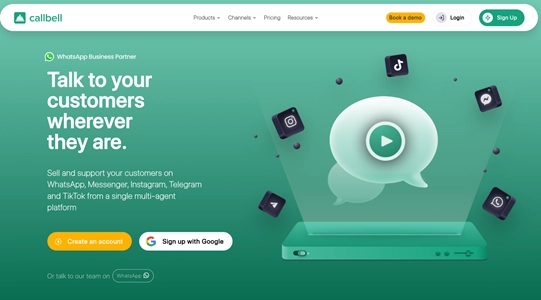
Best for: Service businesses where humans answer everything and just need one organized place to do it.
Callbell's widget lets visitors choose WhatsApp, Instagram or Messenger, and routes every thread into a simple shared inbox with assignment and basic routing.
Limitations: Automation is light by design. This is a tool for answering, not for automating.
Pricing: From ~$15/user/month.
Which WhatsApp Widget Fits Your Website?
The honest split: if you're pre-revenue and just want to be reachable, Joinchat (WordPress) or Elfsight (everything else) solve it today for pocket change. If your team lives in live chat, Tidio is the suite. If WhatsApp is your main support channel and humans do the answering, Wati or Callbell organize the inbox.
SleekFlow leads when the widget has a revenue job: answering the pricing question at 11pm, qualifying the lead, booking the call, and chasing the visitor who bounced, on WhatsApp, where they'll actually see it.
Verdict
For websites adding WhatsApp chat in 2026, SleekFlow is the strongest choice when you want the widget to convert, not just connect: an AI agent that answers, books and follows the visitor to WhatsApp when the tab closes. Joinchat and Elfsight win on speed and price for a simple presence, Tidio wins for site-native live chat, and Wati and Callbell win for human-run WhatsApp inboxes. Decide what the click should lead to (a conversation you have to staff, or one that runs itself) and choose accordingly.












Comments