>>
Technology>>
Artificial intelligence>>
How Small Brands Can Win TikTo...How Small Brands Can Win TikTok’s Evidence Economy with AI UGC
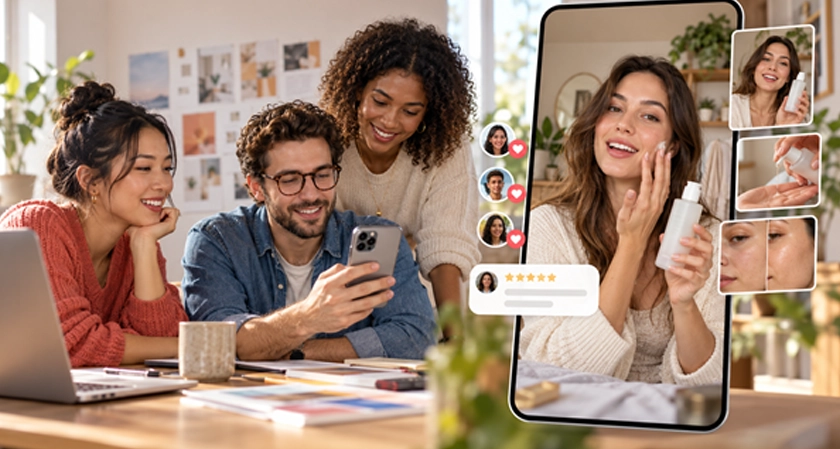
Short-form commerce is entering a more demanding phase. Viewers still want fast, entertaining videos, but they are increasingly using those videos to investigate products rather than simply discover them. They scan comments, compare demonstrations, look for hidden drawbacks, and decide whether a product fits a real situation in their lives. For a small brand, that shift creates an opportunity: credibility can compete with production budget.
TikTok’s 2026 trend forecast describes an “evidence economy” in which people use creator content, reviews, and comments to validate purchase decisions. The same report recommends useful formats such as comparisons, demonstrations, and how-to videos that remove uncertainty. The lesson is not that every company needs to chase a dance or trending sound. It is that brands need a repeatable way to answer the questions that appear between discovery and purchase.
Artificial intelligence can make that production system faster, especially when a company already has product photos, approved claims, FAQs, and customer-support knowledge. But AI is most valuable when it helps a team communicate real evidence. It should not manufacture testimonials, invent product behavior, or make an ordinary item look capable of something it cannot do.
Why “More Content” Is Not the Same as Better Creative
Generative AI has reduced the cost of creating visual variations. That solves a genuine problem for small teams, but it also introduces a tempting mistake: producing dozens of nearly identical videos without a clear question behind them.
A 2026 report from TikTok and WARC found that marketers were widely using AI to increase creative output, while a much smaller share reported comparable improvements in quality. The gap matters because a platform-native video needs more than technically correct footage. It needs a recognizable audience problem, a believable situation, an immediate reason to continue watching, and a useful payoff.
Before generating anything, write a one-sentence job for the video. For example:
- Show how the product fits into a rushed morning routine.
- Answer the most common objection raised by first-time buyers.
- Compare the product’s two most frequently confused options.
- Demonstrate one feature that is difficult to explain with a static image.
- Help a customer decide whether the product is right for a specific use case.
That sentence becomes the filter for every creative decision. If a shot, caption, transition, or avatar does not help complete the job, remove it.
Five UGC Formats That Give Buyers Useful Evidence
The best starting point is not a blank prompt. It is a recurring customer question. A small brand can turn those questions into five dependable formats.
1. The visible problem-and-solution demo
Open on the problem before introducing the product. A cleaning product might start with the specific surface it is designed for. A travel accessory might begin with the packing constraint it solves. The viewer should understand the situation even with the sound off.
Keep the demonstration narrow. One video should prove one point. Trying to cover every benefit in 15 seconds usually produces a rushed list rather than evidence.
2. The “who it is for” guide
Many customers hesitate because they do not know whether a product matches their circumstances. A creator-style presenter can explain who will benefit, what preparation is required, and when another option may be more suitable. Honest boundaries make the recommendation more credible.
3. The comparison video
Comparisons work when both options are shown under the same conditions. Keep the camera angle, lighting, duration, and claim wording consistent. Change only the factor the audience needs to evaluate. Avoid a false comparison in which the preferred option receives better lighting, a more flattering angle, or a different use case.
4. The objection-handling FAQ
Support tickets, product reviews, return reasons, and sales conversations contain useful scripts. Turn one recurring objection into a short video: state the concern in the opening frame, show the relevant detail, and close with a specific next step. Do not hide an important limitation in a fast caption.
5. The behind-the-scenes proof video
Viewers are increasingly receptive to real processes and imperfect details. Show how the product is packed, how a material is selected, how a result is checked, or how a team responds to feedback. AI can help with structure, narration, subtitles, and visual continuity, but the underlying process should remain real.
Build a Reusable AI UGC Presenter
A recurring presenter can make a series easier to recognize. The presenter does not need to look like a glossy commercial model. In fact, natural lighting, ordinary locations, restrained gestures, and realistic skin texture tend to support a more believable creator-style aesthetic.
Teams can use an APOB AI UGC video generator to create a consistent virtual presenter, develop portrait variations, turn selected images into short clips, and add speech or lip sync when those features fit the concept. The tool is only one part of the process; a human should still approve the script, product depiction, disclosure, and final cut.
Start with a short character brief:
A friendly, practical skincare creator in her early thirties, filmed in a bright but ordinary apartment bathroom. Natural skin texture, relaxed delivery, neutral clothing, minimal makeup, and a calm, evidence-led tone. She explains one product detail at a time and never makes medical claims.
The brief should define the presenter’s role and delivery style, not just appearance. Save an approved reference image and reuse it to reduce visual drift across a campaign.
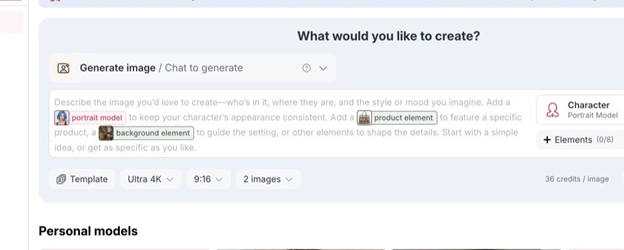
Figure 1. Start by defining the presenter and scene in the image workspace. The screenshot is cropped to show only the creation controls.
Turn One Product Brief into a Controlled Video Batch
Once the presenter and product facts are approved, create a small batch in which each video answers a different buyer question. Do not change everything at once.
A useful batch might contain:
- Problem hook: “If your travel bottle always leaks, check this part first.”
- Demonstration hook: Start with the product already in use.
- Comparison hook: Show two options side by side under the same conditions.
- FAQ hook: Put the exact customer question on screen.
- Behind-the-scenes hook: Begin with the packing or quality-check process.
If the purpose is paid social, an APOB AI ad video generator can help turn approved product images, scripts, or campaign briefs into video-ad concepts. Keep the product facts locked while changing one creative variable at a time. That produces a useful test rather than a pile of unrelated outputs.
For example, a team can hold the body, proof, and call to action constant while testing three opening hooks. If one version keeps viewers longer, the team has learned something about the opening. If the hook, presenter, background, offer, and video length all change together, the result cannot explain what mattered.
A Practical Image-to-Video Workflow
After selecting an approved presenter or product image, switch to Image to Video. Use a vertical 9:16 frame for TikTok-style creative and describe one controlled action instead of several complex movements.
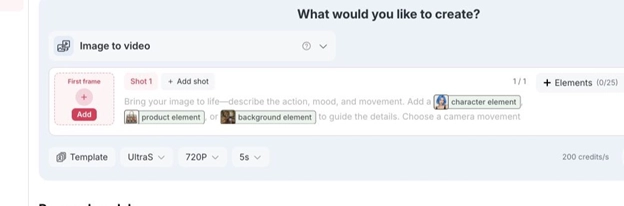
Figure 2. The Image to Video workspace separates the first frame, motion prompt, optional additional shots, elements, quality, resolution, and duration.
Use a prompt such as:
Create a vertical 9:16 smartphone-style product demonstration. The presenter holds the approved bottle close to the camera, points to the pump, dispenses one small amount onto her hand, and gives a natural explanatory reaction. Use soft window light, subtle handheld movement, realistic skin texture, and a clean product close-up. Preserve the exact bottle shape, color, and label. Do not add new claims, text, packaging, or ingredients.
Simple motion is easier to review and usually looks more credible. Generate the visual first, then add voice, captions, and music only after the product and movement are correct.
Protect Accuracy, Rights, and Trust
AI UGC should not be presented as a real customer testimonial when no real customer gave that testimonial. If a synthetic presenter is used, follow the platform’s current AI-content and advertising-disclosure rules. Sponsored claims, prices, discounts, certifications, and performance statements must come from an approved source.
Before publishing, review the video frame by frame:
- Is the product shape, label, color, and usage accurate?
- Does the presenter imply personal experience that did not occur?
- Are before-and-after visuals captured under comparable conditions?
- Are all people, images, voices, music, and product assets authorized?
- Is any important qualification hidden by fast pacing or small text?
- Is the call to action consistent with the current landing page?
Treat AI output as a draft, not evidence. The evidence must come from the product, the demonstration, and the verified information behind the script.
Measure the Video’s Job, Not Just Its Views
Views alone cannot show whether a video helped someone make a decision. Match the metric to the job defined at the beginning.
For a demonstration, watch completion rate, saves, product-page visits, and questions in the comments. For an objection-handling video, look for fewer repeated questions and stronger click-through from qualified viewers. For a comparison, monitor which option people investigate after watching. Comments can also reveal the next question the brand should answer.
The goal is a learning loop: listen to the audience, choose one question, create one clear video, review the response, and use that response to brief the next piece. AI makes the loop faster. Human judgment keeps it useful.
Final Takeaway
Small brands do not need to outspend larger competitors on polished short-form production. They need to be more specific, more responsive, and more credible. A clear product brief, a controlled AI-assisted workflow, and a library of demonstrations, comparisons, FAQs, and behind-the-scenes proof can turn limited assets into a sustainable content system.
The strongest AI UGC does not pretend that technology is the evidence. It uses technology to present real evidence in a format people can understand quickly.
Sources
- TikTok for Business, “TikTok Next 2026 Trend Report.”
- TikTok for Business and WARC, “The New Creative Advantage,” July 2026.
- APOB AI official product pages and the signed-in creation interface, accessed October 29, 2026.











Comments