>>
Technology>>
Artificial intelligence>>
From Ideas to 3D Objects: A Pr...From Ideas to 3D Objects: A Practical Generative AI Workflow
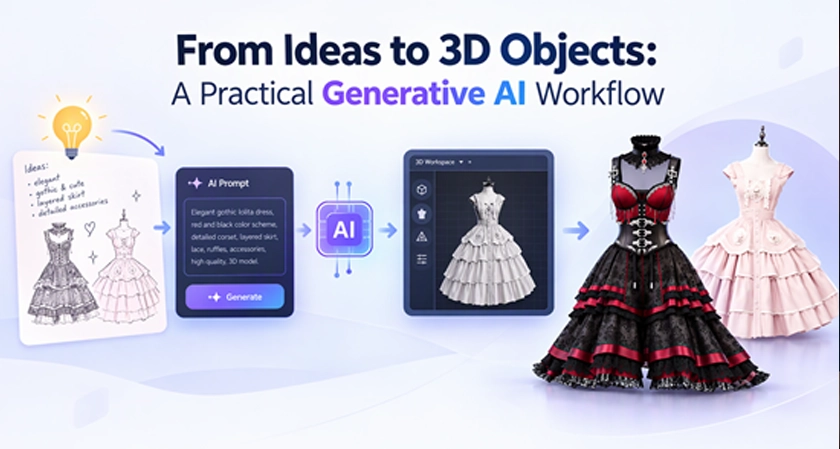
The Gap Between Creative Ideas and 3D Execution
Creating a 3D model from scratch takes time and practice. You need to build its shape, add colors and details, and make sure it works for your project. A game character might need to move, while a product model needs to show what an item looks like. If the idea changes, part of the work may need to be redone, adding time and effort to the process. For beginners and small teams, this is often the biggest challenge: knowing what they want to create but lacking the time, skills, or budget to make it happen.
From Manual Modeling to AI-Assisted Creation
Generative AI can turn a text description or image into a 3D model. With Tripo, creators can try an AI 3D model generator free to see how their ideas look in 3D. This allows teams to compare designs before spending lots of time on detailed modeling, while beginners can create a demo without learning every modeling skill in advance. The result may still need to be modified, but it gives creators something to review before deciding which ideas to develop.
Where AI-Generated 3D Assets Add Value
In gaming and entertainment, AI-generated models help teams test ideas for characters, props, and scenes. For example, a small studio can create a lantern model to see whether its shape and style fit a fantasy village. Independent artists can use the same approach to explore ideas for digital art. By comparing models at an early stage, creators can choose a direction with less time and energy.
Similarly, design teams can use 3D models to compare ideas for packaging, display stands, or new products. These models make designs easier to explain and discuss. However, the accuracy needed depends on their purpose. A model used in an online store should match the real product, while a new product concept needs further checks on size, materials, and how its parts fit together before it can be made.
Text to 3D and Image to 3D in Practice
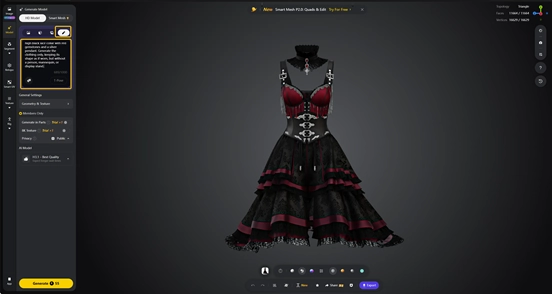
Tripo is an AI-powered 3D creation tool that can help address some of the challenges described above. Of its capabilities, one useful option is Text to 3D. Its workflow begins with a prompt describing the object’s style, shape, and materials. For example, a creator might enter “a deep red Gothic dress with black lace, a fitted corset waist, and a layered skirt.” The creator can then select HD Model and click Generate to produce an initial model. Once generation is complete, the 3D viewport allows users to examine its geometry, including the shape and folds, alongside the textures that define its colors and fabric details. If the result needs further changes, users can refine the prompt and generate another version.
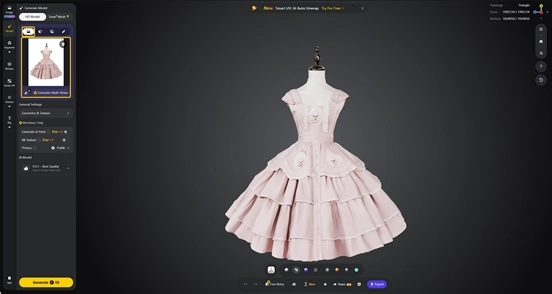
If you prefer to settle the design before generating a model, start with Image Generation or upload a sketch or photo. Then use Edit Image to change a detail or remove an unwanted object. For a dress, this could mean adjusting the sleeves or removing a mannequin from the reference. Preparing the image first gives model generation a clearer starting point.
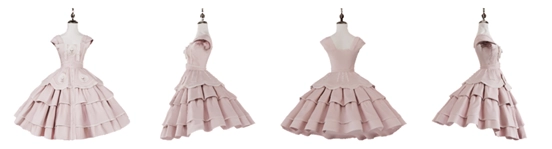
For an optional review step, Generate Multi-Views can create front, left, right, and back references. Compare the waist, sleeves, and skirt across these views before continuing. The extra views propose how hidden areas might look, so check their consistency rather than assuming they reveal the original design.
Once the reference is ready, One-click Convert to 3D sends a selected image into model generation. Alternatively, upload it through Image to 3D, choose the appropriate model option and start generation. The second example shows a pale-pink dress reference in the input panel and a generated model with a fitted waist and layered skirt, displayed on a mannequin. Select Export to see the download options available to your plan.
Tripo may offer free credits or limited access for exploring 3D generation, but available features, credits, export options, and commercial-use rights depend on the current plan and terms. Check Tripo’s latest pricing and licensing information before publishing or using a model commercially.
Human Expertise Still Shapes the Result
When a 3D concept moves into production, the next steps depend on how the model will be used. For example, a game model may need fewer polygons and changes to its textures before being tested in the game engine. For animation, a character needs a digital skeleton so it can move—a process called rigging. If the model will be 3D printed, it needs to be checked for holes, wall thickness, and size. In all these cases, artists and technical teams still need to find and fix problems, improve the model, and test whether it works as intended.
Conclusion
Generative AI can make visual feedback easier for creators. By connecting reference preparation, model generation, and review, it helps creators compare designs and choose where to invest more effort. For those exploring this approach, Tripo offers a practical starting point: choose a small concept, generate a model, and review it against a clear purpose. Combining this early experimentation with professional editing and testing helps teams move from an idea toward an asset that meets their project's needs.













Comments