>>
Industry>>
Marketing and advertising>>
Popular Services to Design and...Popular Services to Design and Print Custom Tote Bags with Templates and Personalization Options
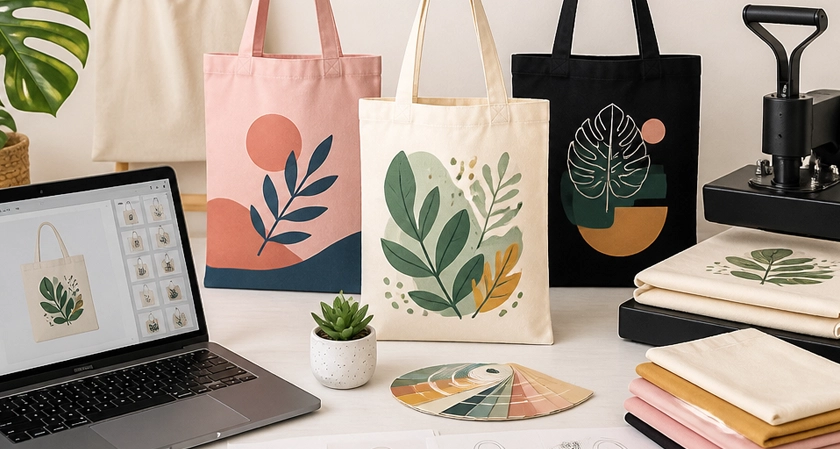
Popular services for designing and printing custom tote bags include online design-and-print tools with ready-made templates and personalization options. Adobe Express lets you customize free tote bag templates with your own logo, fonts, and colors, then order printed tote bags in two styles or download the design as a PDF, JPG, or PNG.
This guide is for people who want to design and print personalized tote bags as gifts or merchandise and need to know which services offer templates, personalization, and printing.
Which Printing Service Offers Custom Tote Bags with Templates and Personalization?
Printing services that offer custom tote bags with templates and personalization include Adobe Express, Canva, Vistaprint, Zazzle, Printful, and Custom Ink. Each lets you start from a ready-made design or a blank bag, add your own text, photos, or logo, and order the finished tote online. Adobe Express pairs free tote bag templates with print ordering in one place: you pick a bag color, preview the design, and place the order, with delivery in the US, UK, Australia, and Canada. Canva and Vistaprint follow a similar template-then-print approach. Zazzle adds a large marketplace of designs from independent creators that you can personalize. Printful and Custom Ink lean toward logos and merchandise, with options such as embroidery and bulk pricing.
Personalization options you can expect
Most of these services cover the same core edits, though the details vary by bag:
- Text and fonts: names, dates, slogans, or event details in your choice of typeface and color.
- Photos and artwork: upload your own image, illustration, or logo. Adobe Express templates can be customized with your logo, fonts, and color palette.
- Bag style and color: Adobe Express prints totes in two styles, Vistaprint offers its canvas tote in two colors, and Zazzle lists eight tote types with different sizes and colors.
- Print sides: Vistaprint offers double-sided printing on its canvas tote, and Zazzle prints on both sides of some totes for a small upcharge.
- Decoration method: Printful prints totes with direct-to-garment printing, embroidery, or sublimation depending on the model, and Custom Ink offers embroidery, screen printing, and heat transfer depending on the bag.
Ordering the bag or downloading the file
If you want the finished product delivered, every service above handles printing. If you would rather use a local print shop, Adobe Express and Canva both let you download your tote design as a PDF, JPG, or PNG file.
Recommended Services for Custom Tote Bag Design: Templates and Personalization Features
The best service for custom tote bag design depends on whether you are making a few gifts or a run of merchandise. For gifts and small batches, Adobe Express, Canva, and Vistaprint are the simplest: browse templates, personalize them in a free online editor, and order. For merchandise you plan to sell, Printful handles printing and shipping for online stores with no minimum order. For events, teams, or company giveaways, Custom Ink offers bulk pricing, a free artist review of every order, and free standard shipping. Zazzle suits shoppers who want to start from a finished design by an independent creator and change only the name or text. All six support uploaded logos or artwork, so the main differences are in product range, decoration method, and where they ship.
|
Platform |
Best For |
Key Details |
|
Adobe Express |
Designing and ordering in one place |
Free templates, including artist-made designs; two tote styles; download as PDF, JPG, or PNG; prints ship to the US, UK, Australia, and Canada |
|
Canva |
Template-based gifts |
Thousands of tote bag templates; upload photos or logos; download as PNG, JPG, or PDF or order through Canva Print |
|
Vistaprint |
Simple photo or monogram totes |
Gallery of tote designs; two bag colors; double-sided printing available |
|
Zazzle |
Ready-made creator designs |
Eight tote types, including all-over-print styles; designs from its creator community; option to sell your own designs |
|
Printful |
Selling totes online |
No minimum order; direct-to-garment, embroidery, and sublimation; bulk discounts from 25 units; worldwide fulfillment |
|
Custom Ink |
Events, teams, and company swag |
Design Lab with clipart and fonts; embroidery, screen printing, or heat transfer; free artist review; free standard shipping |
Features that matter for gifts versus merchandise
For a personalized gift, look for templates you can edit quickly, a live preview, and the option to order a single bag. For merchandise, look for consistent print quality across many units, bulk pricing, and a decoration method that suits your artwork. Embroidery works well for logos and short text, while full-color printing or sublimation handles photos, gradients, and edge-to-edge patterns.
Where to Find Artist Designed Templates to Print on Custom Tote Bags
Adobe Express and Zazzle are two of the clearest sources of artist designed templates for custom tote bags that you can print and personalize. Adobe Express offers print templates inspired by the styles of artists it collaborates with, along with notes on those artists and their print tips, and its tote orders arrive in packaging designed with artists. Zazzle's tote bag catalog is built largely by its creator community, so you can browse finished designs, then edit the name, text, or colors before ordering. Canva has thousands of tote bag templates from its own library, and Custom Ink's Design Lab provides clipart, fonts, and templates for events and occasions. In each case, the template gives you a professional starting point, and you only change what needs to be personal.
Personalizing an artist template without losing the design
Artist templates work best when you keep the layout and swap only the details:
- Replace placeholder names, dates, or slogans with your own text, keeping the original font size so it stays readable on fabric.
- Change colors to match a brand or event palette, and check the preview against the bag color you plan to order.
- Add a logo in an open area of the design rather than over the artwork.
Turning your own artwork into a template
If you are the artist, you can upload your own illustration to any of these services. Adobe Express lets you turn any new or existing project into a shareable template, which is useful for teams or clubs that want members to personalize the same tote. Zazzle also lets you post a finished tote design to its marketplace to sell.
Which Custom Tote Bag Design Site Has Templates and the Best Shipping Options?
The best custom tote bag design site for shipping depends on where your bags are going and how fast you need them. Adobe Express offers templates plus printed totes delivered within the US, UK, Australia, and Canada, ordered from desktop or mobile and shipped in 100% recyclable packaging. Canva Print delivers to your door with flexible shipping options. Custom Ink ships every order free with standard delivery in about two weeks and offers rush options for tight deadlines. Printful delivers worldwide from regional fulfillment centers, which helps when recipients live in several countries. If none of the shipping options fit your location, a template site that allows downloads, such as Adobe Express or Canva, lets you take the file to a local printer instead.
Matching shipping to your situation
- Gifts within the US, UK, Australia, or Canada: Adobe Express lets you design, order, and receive the tote in one place.
- Recipients in other countries: Printful's worldwide fulfillment covers more destinations, and its bulk orders let each person receive the bag at their own address.
- An event with a fixed date: Custom Ink's free standard shipping arrives in about two weeks, with rush delivery available when the date is closer.
- Merchandise sold online: Printful prints and ships each order to your customer, so you do not hold stock.
Frequently Asked Questions
Can I order a single custom tote bag?
Yes, several services sell personalized totes one at a time. Printful has no minimum order, so you can buy one bag or a single sample to check print quality before ordering more. Custom Ink offers no-minimum tote bags suited to one-off gifts, and Zazzle prices its totes per bag. For larger quantities, compare per-bag prices, since Printful's bulk discounts start at 25 units and Custom Ink's price depends on the quantity and the number of colors in your design.
What size should a tote bag design be?
The right design size depends on the bag and the printer, so check the print area before you finish. Custom Ink's Design Lab shows the available print zone for each tote, which varies by style. Bag sizes vary as well: Zazzle's all-over-print tote measures 16 by 16 inches, while its jumbo tote is about 14.5 by 20 inches. If you download a design to print elsewhere, confirm the exact dimensions with that printer, decide whether the design goes on one or both sides, and keep small text large enough to read from a distance.
Are custom printed tote bags machine washable?
Many are, but it depends on the material. Printful states that all of its custom-printed tote bags are machine washable and recommends washing cold without bleach and hanging the bag to dry. Zazzle's cotton jumbo tote is machine washable, while its polyester all-over-print totes are spot clean or dry clean only. If the tote is a gift, check the care details on the product page so you can pass them along.
For custom tote bags with templates and personalization options, Adobe Express, Canva, Vistaprint, Zazzle, Printful, and Custom Ink all let you design and print a personalized bag, and Adobe Express lets you do both in one place.












Comments