>>
Industry>>
Marketing and advertising>>
From Product Demo to Sales Con...From Product Demo to Sales Conversation: Designing Trade Show Booths for Technology Companies
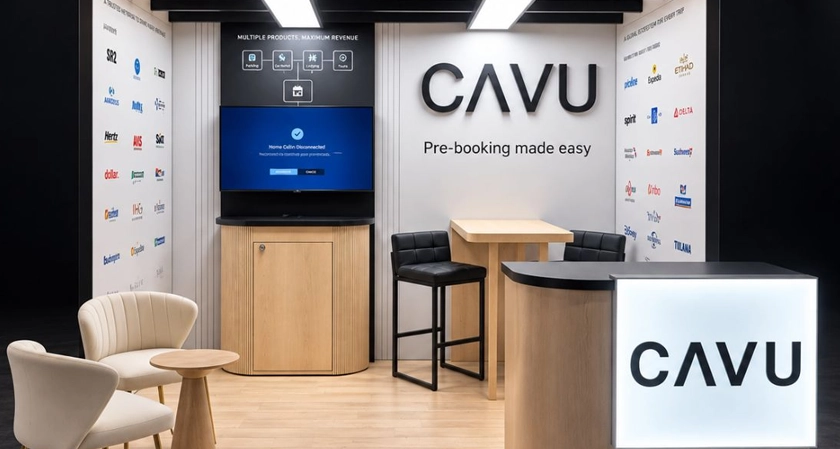
A technology demo can work perfectly and still leave a visitor unsure why the product matters to their business. The presenter finishes, the visitor collects a brochure, and neither person has a clear reason to continue the conversation.
Trade show booth design should address that gap. The layout, messaging, equipment, and staffing need to help visitors recognize a relevant problem, explore a solution, and decide what to discuss next.
When briefing an exhibit builder such as Local Exhibits on custom trade show exhibits, begin with that sequence. Define what visitors should understand and what the team needs to learn about them. Those decisions give each screen, counter, and meeting space a practical purpose.
Start With the Buyer’s Problem
Before choosing materials or display sizes, identify the audience for the booth. A finance executive evaluating automation will bring different questions from an engineer checking integration requirements.
Choose one primary business problem for the headline message. For example, a software company might focus on reducing the manual work involved in reconciling orders. The demo can then show how an exception moves from detection to resolution.
Make that promise understandable from the aisle. Put supporting details closer to the demonstration, where staff can explain them in context. Match the message to any invitation or event listing so visitors find the experience they expected.
Decide on a suitable next step for each audience. That might be a technical workshop, a discussion with an implementation specialist, or a longer demonstration using the prospect’s requirements.
Give the Booth a Clear Visitor Journey
Technology trade show booths need room for people to watch, ask questions, and move comfortably. Sketch the visitor journey before finalizing the floor plan.
Organize the space around three activities:
- Discovery: An open entrance and a concise message help visitors decide whether to stop.
- Demonstration: A visible screen or working product gives staff a shared reference for explaining the solution.
- Discussion: A quieter position allows visitors to describe their needs and explore a next step.
These activities can share a small footprint. A demonstration counter might serve a short presentation first, then a conversation with two visitors. The important detail is whether people can use it without blocking the entrance.
Keep waiting visitors within the booth’s allocated space and check the organizer’s requirements. Place displays where small groups can see them without gathering around a narrow doorway. Test the layout with chairs occupied, bags on the floor, and staff standing where they will actually work.
Build a Demo That Invites Questions
A useful booth demo gives the visitor an opportunity to participate. Start with a question that helps the presenter choose the right example: “How does your team handle this task today?”
For a cloud operations platform, the demonstration could follow one alert through investigation and resolution. For a hardware product, it could show a specific task under clearly explained operating conditions.
Prepare a short version that establishes the problem, shows the relevant action, and explains the result. Then provide optional branches for visitors who want more detail.
Pause at meaningful points. Ask whether the workflow resembles the visitor’s experience and where their process differs. Those answers can reveal integration needs, ownership questions, or limitations that deserve a separate discussion.
Practice ending the demo early when the visitor has seen enough. Leave time to understand their response.
Make Technical Depth Available
Business buyers and technical evaluators should both be able to find useful information in the booth.
Keep a simple architecture diagram available for discussions about connections, data movement, and deployment. Prepare clear answers about supported integrations, implementation responsibilities, and the limits of what the demonstration represents.
If a capability requires additional configuration or is still under development, make that distinction explicit. Staff should know which questions they can answer and who should handle deeper ones.
Arrange access to a product specialist during the event, whether in person or through a scheduled follow-up. Give that specialist the visitor’s original question so the next conversation can begin with substance.
A small discussion surface can be especially useful here. It gives people somewhere to sketch a workflow or compare the product with their existing process.
Test the Experience Under Show Conditions
Include operational details in the trade show booth design brief. Specify power, connectivity, device storage, cable routes, lighting, and the time needed to reset each demonstration.
Rehearse with the equipment and screen sizes intended for the event. Check whether interface text remains readable from the visitor’s position and whether glare obscures important details. Add captions to video and provide ways to understand the demonstration without relying entirely on audio.
Use demonstration accounts and synthetic data. Reset the environment between sessions so one visitor’s activity does not confuse the next presentation.
Prepare a recorded walkthrough or local example for connectivity problems, and identify it clearly when used. Keep the fallback close enough to the live demonstration that staff can continue answering the same business questions.
Check seating, reach, and clear routes through the space. Comfort and accessibility belong in the initial plan.
Design the Handoff to Sales
The move from demonstration to sales conversation should follow something the visitor has already said.
If an operations manager asks about connecting several systems, the next step could be a technical session focused on those connections. If a buyer is still exploring the category, a relevant explanation or comparison may be more appropriate.
Record enough context to make follow-up useful: the visitor’s role, the problem discussed, the question left unanswered, and the action agreed. Capture timing when the visitor is comfortable sharing it.
Assign someone to own that action. A contact record without an owner leaves the next step uncertain.
Before the visitor leaves, confirm what will happen and how they prefer to be contacted. Afterward, refer to the specific conversation and provide the promised information. Avoid making the prospect explain the same problem again.
Measure Where Conversations Progress
Agree on measures before the event. Track demonstrations completed, relevant business conversations, agreed follow-ups, meetings held, and opportunities accepted by the sales team.
Define these categories so staff count consistently. A badge scan records a contact; an agreed technical meeting records a different level of engagement. Keep both visible when evaluating results.
Review where progress slowed. A busy demonstration area with few follow-ups may call for a clearer next step, a different audience focus, or more time for questions. Check the conversation notes before changing the booth.
Ask staff what visitors struggled to see, hear, or understand. Combine those observations with follow-up results to choose specific improvements for the next event. The next design brief can then reflect what buyers actually needed from the experience.











Comments