>>
Technology>>
It service>>
5 Best Remote Support Tools fo...5 Best Remote Support Tools for Field Technicians in 2026
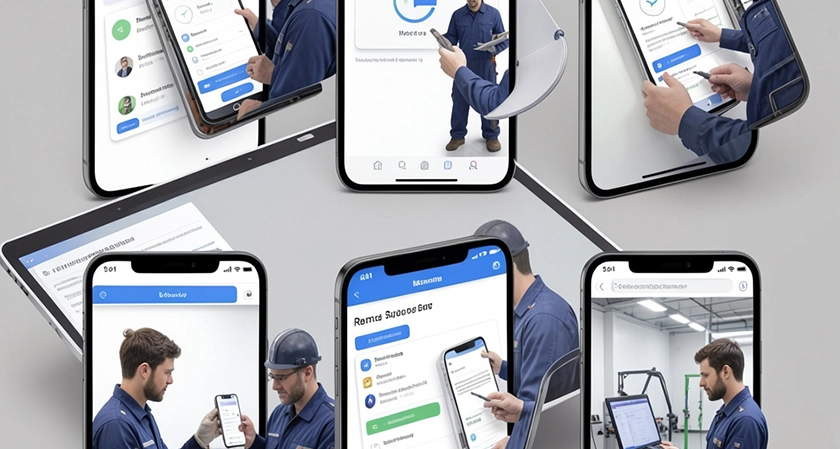
Field technicians operate in some of the most demanding conditions that IT tools encounter. They move between customer sites, warehouses, data center floors, and industrial environments often without reliable connectivity, always under time pressure, and frequently working alone without an IT colleague to call on. When they encounter a technical issue they cannot resolve independently, the remote support tool their organization provides determines how quickly they can get expert guidance and return to productive work.
The right remote support tool for field technicians is not simply the most feature-rich option; it is the platform that delivers reliable performance over variable network conditions, works across the mix of mobile and desktop devices technicians actually carry, and connects them to back-office expertise without introducing friction that slows the service call. This listicle evaluates five remote support platforms that serve field technicians well in 2026.
Splashtop
Splashtop is the strongest all-around choice for organizations deploying remote support to field technician teams. The platform delivers high-definition, low-latency remote support sessions over the variable network conditions that field environments routinely produce whether a technician is connected via 5G at a customer site, running over LTE in a rural service territory, or connected to a congested customer Wi-Fi network.
The best remote support tool for technicians from Splashtop supports attended sessions initiated through a shareable link that requires no pre-installed software on the technician's endpoint, a critical capability when the device needing support is a customer-facing system the technician cannot modify. For internal device support, unattended access via a pre-deployed agent allows IT teams to reach a technician's laptop or tablet directly without requiring the technician to facilitate a connection, which matters when the device itself is the problem.
Cross-platform support covers Windows, Mac, Linux, iOS, and Android, accommodating the mixed device environments that field teams operate. In-session capabilities include file transfer, remote reboot, Wake-on-LAN, multi-monitor navigation, and session recording. Active Directory and LDAP integration, SAML-based SSO, and role-based access controls allow IT departments to manage technician access to organizational systems within the remote support platform using the same identity infrastructure applied elsewhere. Splashtop holds SOC 2 Type II, HIPAA, ISO 27001, GDPR, and FERPA certifications, which matters for field organizations operating in regulated industries such as healthcare or utilities.
Microsoft Teams and Quick Assist
For field technician organizations already operating within the Microsoft 365 ecosystem, Quick Assist and Microsoft Teams provide a zero-incremental-cost attended support capability. Quick Assist allows IT helpdesk staff to take control of a technician's Windows device remotely, and Microsoft Teams enables screen sharing, annotation, and real-time video collaboration during a support session.
For simple attended support scenarios where a remote expert needs to see what a field technician sees and provide guidance, the combination of Teams screen sharing and Quick Assist covers the basic use case without additional procurement. When a field technician using a HoloLens or mobile device needs expert guidance on a complex repair, Microsoft's Dynamics 365 Field Service integrates directly with remote collaboration to allow experts to annotate the technician's physical environment in real time. The field service management software overview at Microsoft Learn describes how this capability sits within the broader field service management workflow, connecting remote support activity to work orders, scheduling, and asset management in a unified operational environment.
The practical limitations for general remote support across field teams are familiar: Quick Assist covers Windows devices only, session recording and audit logging require additional configuration, and organizations managing large device estates with diverse operating systems will find coverage gaps that require a separate tool.
NinjaOne Remote
NinjaOne Remote is embedded within the NinjaOne RMM platform and provides a consolidated endpoint monitoring and remote support environment that suits IT organizations managing distributed field technician device fleets. From the NinjaOne console, IT staff can view device health, patch status, and active alerts for every enrolled technician device, then initiate a remote session without switching applications.
For field technician support specifically, the value of NinjaOne's RMM integration is in its proactive capability. Automated patch management and policy-based endpoint configuration can address many common technical issues before a technician encounters them in the field. When a remote session is required, the connection initiates through the NinjaOne agent already deployed on the device, which eliminates the deployment friction of getting a separate remote support agent onto a field device.
The platform supports unattended access to Windows and Mac endpoints, with session recording and role-based access controls meeting enterprise audit requirements. Per-device pricing scales predictably with the size of the field device fleet, which suits organizations with large technician teams and high device-to-IT-staff ratios.
ConnectWise ScreenConnect
ConnectWise ScreenConnect supports both attended and unattended remote access across Windows, Mac, and Linux, and includes session recording, granular permission controls, and integration with ConnectWise PSA for ticket-based session logging. For IT organizations supporting field technician teams through a managed service provider, ScreenConnect is frequently the platform already in use, which means field technicians may interact with it as end users without the organization needing a separate procurement evaluation.
The concurrent session licensing model suits helpdesk environments where IT staff support multiple field technicians simultaneously, keeping costs aligned with helpdesk capacity rather than device count. White-label branding allows MSPs to present the session interface under their own company identity, which is relevant for field service organizations whose IT support is delivered by an external provider.
For organizations deploying ScreenConnect directly rather than through an MSP relationship, the platform's rising licensing costs and the administrative overhead of managing it outside the ConnectWise ecosystem warrant careful total-cost-of-ownership evaluation before commitment.
Field technicians depend on reliable wireless connectivity to maintain contact with remote support teams during active sessions. Britannica's reference on wireless communications technology reference covers the underlying technologies, radio-frequency, microwave, and cellular network communications that determine the quality of the connection field technicians rely on when receiving remote support in challenging environments.
Atera
Atera is an all-in-one RMM and remote support platform with a per-technician pricing model that is particularly well-suited to field service organizations managing large device estates with small IT teams. Rather than paying per endpoint, which creates cost uncertainty as device fleets grow, Atera's per-technician pricing gives IT departments a fixed tooling cost regardless of how many devices each technician manages.
The platform includes attended and unattended remote access, automated patch management, ticketing, Wake-on-LAN, and AI-assisted ticket summarization within a single interface. For IT teams supporting field technicians across Windows, Mac, and Linux devices, the consolidated feature set reduces the number of separate tools required to maintain device health and provide remote support across a distributed workforce.
Session recording and audit logging are included, and the platform's relatively rapid onboarding makes it practical for organizations building out an IT support function as their field technician team grows. Healthcare and regulated-industry field organizations should verify current compliance certification status against their specific framework requirements before selecting Atera as their primary remote support platform.
What Field Technicians Need From Remote Support Tools
The performance requirements for remote support in field environments differ from those of office-based support in several important ways. Network resilience is the most critical: a remote support platform that degrades unacceptably over LTE or congested Wi-Fi will fail at the moment field technicians need it most. Platforms that maintain usable session quality over variable and limited connectivity through adaptive streaming, session compression, or efficient protocol design deliver meaningfully better outcomes in field contexts than those optimized for stable office networks.
Mobile device support breadth matters because field technicians increasingly work from smartphones and tablets rather than laptops. A remote support platform that provides full functionality from a mobile device, not just a degraded mobile companion app, supports the actual working conditions of modern field technicians.
Session initiation speed is also operationally significant. A field technician mid-repair who cannot get connected to remote support within thirty seconds is more likely to abandon the support session and attempt an independent resolution often with worse outcomes. Platforms that offer shareable link-based session initiation, without requiring the technician to navigate a portal or install additional software in the moment, reduce that friction where it matters most.
Frequently Asked Questions
What features matter most for remote support used by field technicians specifically?
Network resilience over variable LTE and Wi-Fi connections, fast session initiation via shareable links, cross-platform support across mobile and desktop devices, and in-session file transfer for pushing diagnostic tools or firmware files to the technician's device. Unattended access for after-hours device maintenance and Wake-on-LAN for reaching offline devices are also valuable in field fleet management contexts.
How should organizations choose between standalone remote support tools and integrated RMM platforms for field teams?
Organizations with small IT teams managing large field device fleets benefit most from RMM-integrated platforms that proactively manage device health and reduce the frequency of reactive support sessions. Organizations with straightforward support needs and without dedicated IT staff benefit more from lightweight attended support tools with fast session initiation and low deployment friction. The right choice depends on the IT maturity of the organization and the complexity of the field device estate.
Can remote support tools work effectively over cellular connections in rural or remote field environments?
The best platforms adapt streaming quality and session performance based on available bandwidth, maintaining a usable session even over constrained LTE connections. Organizations deploying remote support to technicians in rural or low-coverage areas should test platform performance over the network conditions their technicians actually encounter rather than relying on marketing claims about connectivity resilience.