>>
Technology>>
Cyber security>>
CCTV Monitoring in Office Buil...CCTV Monitoring in Office Buildings and Coworking Spaces: Compliance for Building Managers and Tenants
The Silicon Review
01 July, 2026
Author:
Guest
Office buildings and coworking spaces rely on CCTV to manage security, investigate incidents, support access control, and protect shared property. But surveillance programs can quickly collect more information than the business actually needs. A camera aimed too broadly may capture neighboring tenant activity. A long retention schedule may preserve weeks of routine movement with no security value. A shared video clip may expose employees, visitors, delivery drivers, and vehicles that have nothing to do with the incident being reviewed.
For U.S. building managers and tenants, the practical compliance question is not simply “Can we use cameras?” It is “How do we design, operate, retain, and share CCTV footage in a way that limits unnecessary collection?” That is the core of data minimization in video surveillance: collect what is needed, avoid what is not, keep it only as long as justified, and reduce identifiability before footage leaves the original security workflow.
Why Data Minimization Matters in Office and Coworking CCTV?
Video surveillance in a commercial property often involves multiple organizations. The property manager may operate cameras in the lobby, loading dock, elevators, parking garage, reception area, exterior doors, and common corridors. Tenants may operate their own cameras inside leased suites, at private reception desks, in server rooms, or in dedicated event areas. Coworking operators may also monitor shared desks, meeting room entrances, mailrooms, and community spaces.
Each party should be able to explain why a camera is needed, what it captures, who can access the footage, how long recordings are kept, and when video may be shared. Without that discipline, surveillance can become overbroad. Over-collection increases privacy concerns, complicates responses to access requests or subpoenas, and creates more sensitive material to protect during a security incident.
In the U.S., video surveillance rules may involve state privacy laws, workplace notice expectations, biometric privacy considerations where analytics such as facial recognition are used, wiretapping and audio-recording laws, lease obligations, security policies, and sector-specific requirements. Because requirements vary, building teams should work with counsel where needed. From an operational standpoint, however, a minimization-first design is useful across jurisdictions because it reduces the amount of identifiable footage created in the first place.
Start With Camera Placement: Capture the Security Event, Not the Whole Workplace
The most effective way to reduce privacy risk is to avoid collecting unnecessary footage at the camera design stage. Once a camera records an image, the organization must secure, manage, review, and eventually delete it. Better placement reduces that burden.
For office buildings, cameras are usually easier to justify in areas tied to physical security, access control, and asset protection. These may include main entrances, elevator banks, parking entrances, loading areas, building reception, emergency exits, bicycle storage, package rooms, and other shared zones where incidents are reasonably foreseeable.
By contrast, cameras should be treated with caution in areas where people reasonably expect more privacy or where monitoring may feel intrusive. Examples include restrooms, locker rooms, wellness rooms, lactation rooms, prayer rooms, changing areas, medical rooms, and areas used for confidential meetings. In ordinary office settings, continuous monitoring of individual desks, computer screens, whiteboards, private offices, or break rooms can easily exceed the stated security purpose unless there is a specific and documented justification.
Tenants should also avoid aiming cameras into shared corridors beyond what is necessary to monitor their own entrance. A camera installed to protect a suite door should not capture the daily movement of neighboring tenants if a narrower angle would work. Similarly, a property manager’s corridor camera should be positioned to cover common-area security needs without looking deep into a tenant’s reception area or workspace.
Field of View Is a Compliance Control
Field of view is not only a technical setting. It is a privacy and compliance control. A wide-angle camera may be convenient for security teams, but it may also record faces, license plates, computer monitors, badge details, visitor sign-in sheets, and business activity unrelated to the purpose of monitoring.
Building managers and tenants should review each camera view during installation and periodically afterward. The review should ask practical questions:
- Does the camera capture only the area needed for the stated security purpose?
- Can the lens angle be narrowed or repositioned?
- Can masking or privacy zones be applied to exclude desks, screens, tenant entrances, or neighboring property?
- Is the camera collecting license plates when vehicle identification is not needed?
- Does the recording include audio, and if so, is audio truly necessary?
Audio recording deserves special attention in the U.S. because state laws on recording conversations can be strict. For most office-building CCTV programs, disabling audio by default is a sensible minimization measure unless there is a clearly reviewed reason to use it.
Retention: Keep Footage Long Enough to Serve the Purpose, Not Indefinitely
Retention is one of the most common weak points in office surveillance programs. If footage is kept for too long, the building or tenant accumulates a large archive of identifiable activity that may no longer have operational value. If it is deleted too quickly, security teams may lose the ability to investigate incidents that are discovered after the fact.
A practical retention policy should connect the storage period to real business needs. For example, a property manager may consider how long it typically takes to report theft, vandalism, access disputes, vehicle damage, or workplace incidents. A coworking operator may consider member complaints, package claims, after-hours access events, and building security procedures. Tenants may consider internal incident reporting timelines, insurance requirements, and legal hold obligations.
The policy should also distinguish routine footage from incident footage. Routine recordings can follow the standard deletion cycle. Footage tied to a documented incident may be preserved separately while the issue is investigated, a claim is pending, or counsel has issued a legal hold. This avoids turning every recording into a long-term record while still preserving evidence when there is a legitimate need.
Who Is Responsible for Footage in a Multi-Tenant Building?
In a typical U.S. office building, responsibility follows operational control. The property manager generally controls cameras in common areas. The tenant usually controls cameras installed inside its leased premises. A coworking operator may control cameras in shared member areas, while enterprise members may control cameras inside dedicated private suites if their agreement permits it.
This division should be written into leases, building rules, coworking membership agreements, or security appendices. The documents do not need to be overly complex, but they should identify who operates each system and who decides:
- the purpose of monitoring;
- camera locations and viewing angles;
- access permissions for live and recorded footage;
- retention periods;
- procedures for exports, sharing, and redaction;
- when raw footage may be preserved or disclosed.
Technical access should not be confused with responsibility. A building engineer may be able to retrieve a file from a recorder, but that does not mean every tenant can receive an unredacted copy. Likewise, a tenant’s security team may request lobby footage, but the property manager should still assess whether the tenant needs the entire recording or only a limited excerpt.
Sharing Footage Between Building Managers and Tenants
Most compliance issues arise when footage is exported and shared. Internal live viewing by authorized security personnel is one scenario. Sending a video clip to a tenant, another tenant, a contractor, an insurer, or a communications team is different because more people gain access to identifiable images.
Before sharing CCTV footage, the disclosing party should follow a simple operational sequence:
- Define the purpose of the request, such as investigating property damage, confirming unauthorized access, reviewing a slip-and-fall allegation, or documenting a delivery dispute.
- Limit the time period to the shortest useful clip instead of exporting a long segment.
- Crop or select the camera angle that best answers the question with the least unrelated activity.
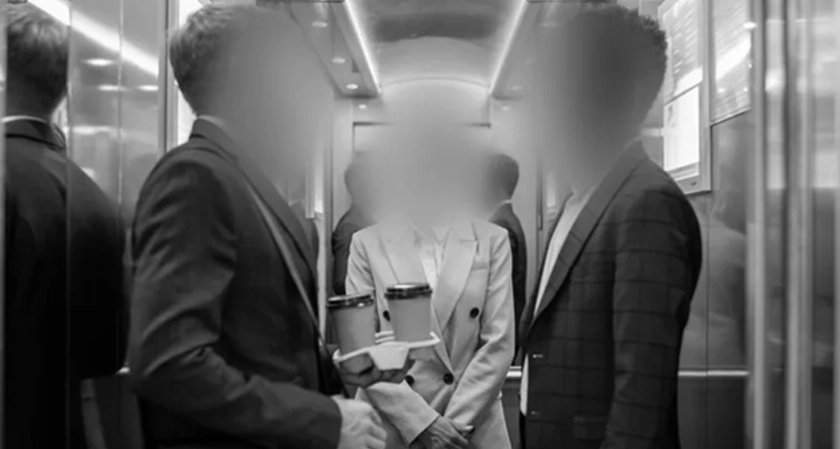
- Blur faces and license plates when identifiable people or vehicles are not necessary for the recipient’s purpose.
- Document who received the footage, why it was shared, and whether it was redacted.
For example, if a tenant reports damage outside its suite, the property manager may need to review corridor footage. The tenant may not need to see every visitor who passed through the hallway that morning. A shortened, redacted clip may be enough to show the relevant event while reducing unnecessary disclosure of bystanders.
The same logic applies in reverse. If a property manager asks for video from a tenant’s reception area to understand a maintenance issue, the tenant should consider whether the manager needs recognizable faces of employees, clients, or visitors. If not, the tenant should provide a minimized version.
Using CCTV Footage for Coworking Events, Marketing, or Public Updates
Footage collected for security should not automatically be repurposed for marketing, public relations, social media, or community updates. A coworking operator may host networking sessions, product demos, workshops, investor events, and member gatherings. Cameras may incidentally capture attendees, guest speakers, name badges, branded materials, and vehicles in parking areas.
Before publishing or externally distributing images or video, the organization should ask whether identifiable people are central to the message or merely in the background. If the goal is to show the room layout, crowd size, stage setup, property condition, or incident context, identifiable faces may not be needed. Face blurring can allow the communication to move forward while limiting the exposure of attendees who did not expect to be featured.
License plates should receive similar attention. Parking lot footage, driveway clips, and curbside delivery videos often include plates from employees, members, visitors, vendors, and rideshare drivers. Even where a plate is not the focus of the clip, blurring it before broader sharing is a practical way to reduce over-collection and avoid unnecessary identification.
Where Video Redaction Software Fits Into the Workflow?
Manual video editing can be slow when a property team handles multiple incident clips, parking recordings, or coworking event files. For organizations that want local processing rather than sending recordings to external services, dedicated redaction software can help operationalize minimization.
One option used in this context is Gallio PRO, available at https://gallio.pro/. In a building or tenant workflow, its role is specific: Gallio PRO automatically blurs only faces and license plates. That distinction matters. It should not be described as a tool that automatically removes every type of personal or confidential information in a video. Items such as documents, name badges, logos, tattoos, computer screens, or other sensitive visual details require separate review and, where supported, manual handling by the user.
The product materials also state that the system does not store logs containing detection data or personal data. For property managers and tenants building a controlled footage-sharing process, that can be relevant when evaluating how redaction work fits into internal security and privacy procedures.
A Practical CCTV Minimization Checklist for Building Teams
Building managers, coworking operators, and tenants can reduce over-collection by treating CCTV as a governed system rather than a set of cameras installed once and forgotten. A workable checklist includes:
- Map all cameras by owner, location, purpose, and recording status.
- Confirm that each camera has a defined security or operational purpose.
- Review field of view to avoid capturing tenant workspaces, screens, private areas, or neighboring premises unnecessarily.
- Disable audio unless it has been specifically reviewed and approved.
- Use privacy masks, narrower angles, or repositioning where possible.
- Set retention periods based on actual incident-response needs.
- Create a separate process for preserving incident footage under legal hold or investigation.
- Limit user access to personnel with a documented need.
- Require redaction before sharing footage unless identifiable images are necessary.
- Document exports, recipients, purpose, and redaction decisions.
FAQ - Office and Coworking CCTV
Should tenants and building managers share raw CCTV footage by default?
No. The better practice is to share only the shortest relevant excerpt and blur faces or license plates when identification is not needed for the request.
Who should redact footage before it is shared?
Usually, the party that controls the camera system should prepare the minimized version before disclosure. A tenant should redact footage from its own premises before sending it to the property manager, and the property manager should do the same for common-area footage before sending it to a tenant.
Do office CCTV systems need to record every common area?
No. Camera placement should be tied to a specific security or operational purpose. Recording areas simply because they are technically easy to monitor can lead to unnecessary collection.
How long should office building CCTV footage be retained?
There is no single retention period that fits every property. The period should reflect incident-reporting timelines, security needs, insurance considerations, and legal hold requirements. Routine footage should not be kept indefinitely.
Does Gallio PRO automatically blur everything sensitive in a recording?
No. Gallio PRO automatically blurs only faces and license plates. Other visual details, such as badges, documents, logos, tattoos, or computer screens, are not automatically detected and require separate review.
Why is data minimization useful even when surveillance is allowed?
Because lawful monitoring can still be excessive. Minimization reduces unnecessary collection, limits exposure when footage is shared, simplifies retention, and helps building managers and tenants operate CCTV systems with clearer boundaries.




















Comments