>>
Technology>>
It service>>
Why Document Interoperability ...Why Document Interoperability Is Becoming Critical Infrastructure for Modern Businesses
The Silicon Review
20 July, 2026
Author:
Guest
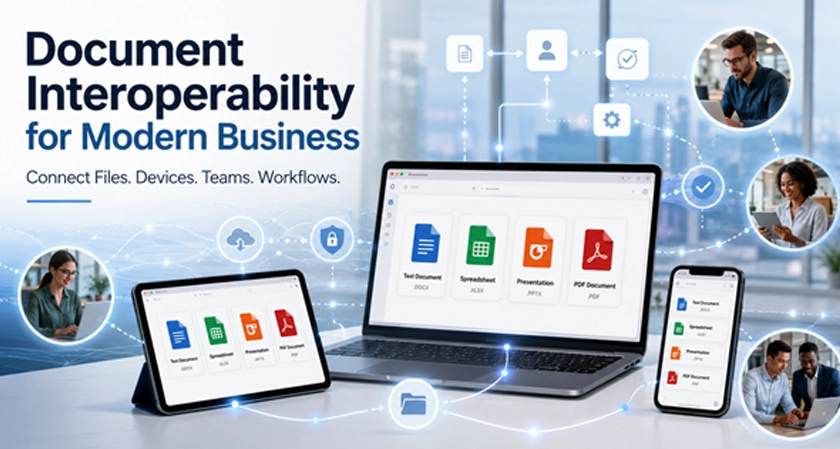
Modern businesses depend on documents to move information between employees, departments, customers, and external partners. Reports are written as text documents, budgets are maintained in spreadsheets, sales plans are presented through slide decks, and contracts are often distributed as PDFs. These files may be created on Windows computers, reviewed on mobile devices, shared through cloud platforms, and processed by automated business systems.
Although these activities appear routine, they can become inefficient when files do not work consistently across applications and devices. Formatting may change after conversion, spreadsheet formulas may behave differently, presentation layouts may shift, and employees may struggle to identify the latest approved version.
Document interoperability is therefore becoming more than a convenient software feature. It is part of the digital infrastructure that determines how efficiently information moves through an organization. Businesses that improve interoperability can reduce operational friction, support hybrid work, and prepare their document workflows for greater automation.
What Document Interoperability Means for Businesses
File compatibility and document interoperability are related, but they are not identical. Compatibility usually means that an application can open a particular file type. Interoperability means that the document remains useful throughout the entire business workflow.
An interoperable document should retain its structure, formatting, data, and essential features when it is opened, edited, reviewed, or shared through different environments. Comments should remain visible, tables should preserve their layout, formulas should continue to produce the expected results, and images should stay in the correct position.
Interoperability also includes the ability to move information between editable documents and finalized formats. A team may draft a policy as a text document, review it across several devices, convert it to PDF, collect comments, and store the approved version without rebuilding the file at every stage.
This distinction matters because a file that merely opens may still create significant work. Employees may need to repair formatting, recreate charts, confirm missing data, or compare several versions before they can continue.
Where Fragmented Document Workflows Create Business Risk
Formatting and Data Loss
Formatting problems are often treated as minor inconveniences, but they can affect business communication and decision-making. A misplaced table may make a financial report difficult to interpret. A changed font or image position can make a customer presentation appear unprofessional. More seriously, altered spreadsheet formulas or missing data can lead to inaccurate analysis.
These risks increase when employees frequently convert documents between formats or use different applications for each stage of the workflow.
Multiple Versions of the Same File
Email attachments and local downloads make it easy to create duplicate files. Employees may save documents with names such as “final,” “final-updated,” and “final-v2,” without a reliable way to determine which version has been approved.
When several people edit different copies, important changes can be lost. Managers may approve an outdated file, while employees continue working on another version stored elsewhere.
Device-Dependent Workflows
Hybrid and remote employees regularly move between desktop computers, tablets, and smartphones. A workflow becomes device-dependent when a document can only be edited correctly on one particular computer or through one application.
This dependency delays work when employees travel, work from home, or need to respond outside normal office hours. It also reduces business resilience because essential tasks depend on access to a specific device.
Disconnected PDF Processes
PDFs are commonly used for contracts, invoices, policies, reports, and finalized customer documents. However, many organizations treat PDF work as a separate process that requires additional applications for viewing, commenting, converting, and organizing files.
When PDF tools are disconnected from the wider office environment, employees must repeatedly export, upload, download, and convert documents. Each additional step creates another opportunity for errors or outdated versions.
What an Interoperable Office Environment Should Support
Common Business File Formats
Employees should be able to work with the document formats they encounter every day, including text documents, spreadsheets, presentations, PDFs, templates, and files supplied by customers or partners.
Organizations benefit when employees can manage common document types within a consistent working environment. Platforms such as WPS Office can support document, spreadsheet, presentation, and PDF tasks without requiring teams to rebuild their workflow for every file format.
Before introducing any platform, businesses should test it with real working files rather than simple samples. Complex spreadsheets, branded presentations, multi-page reports, forms, comments, images, and embedded tables provide a more accurate view of how the software will perform.
Cross-Device Continuity
Cross-device access should allow employees to continue meaningful work rather than simply view files. A manager may need to review a report from a tablet, a salesperson may update a presentation before a meeting, and a remote employee may add comments from a mobile device.
Not every task needs to be completed on a phone, but employees should understand which activities can be performed safely and reliably on each device.
Reliable Export and Sharing
An interoperable environment should support predictable exporting and sharing. Employees should be able to create a document, preserve an editable copy, and generate a stable PDF for external distribution.
Before sending files to customers, suppliers, or regulators, teams should verify that formatting, links, tables, images, and page structure remain correct. This is especially important for documents that may be opened through unfamiliar software.
Why Interoperability Matters for Automation and AI
Businesses are increasingly using automation and artificial intelligence to classify documents, extract information, create summaries, route approvals, and support decision-making. These systems depend on consistent and well-structured input files.
When documents use unpredictable layouts, inconsistent names, or incompatible formats, automated processes become less reliable. A workflow may fail to identify the correct fields, extract the wrong data, or send a document to the wrong approval stage.
Many organizations invest in automation before standardizing the documents moving through the process. This limits the value of the automation itself. Technology cannot fully compensate for unclear ownership, duplicate files, inconsistent templates, and poorly managed versions.
Document governance should therefore be established before complex automation is introduced. Standard templates, file names, approval statuses, and storage rules give automated systems a more reliable foundation.
AI-generated summaries and document analysis should also remain subject to human review. Employees need access to the original file so that important figures, obligations, and contextual details can be verified before decisions are made.
Business Benefits of Better Document Interoperability
Faster Reviews and Approvals
Reviews move more quickly when decision-makers can open, comment on, and approve files without changing devices or converting formats. Employees spend less time troubleshooting and more time evaluating the actual content.
Fewer Operational Errors
Consistent document handling reduces formatting damage, duplicated work, incorrect attachments, and edits made to outdated versions. It can also reduce manual data entry when information moves more reliably between documents and business systems.
Lower Support and Training Costs
Employees need less assistance when common document tasks follow a familiar process. IT teams receive fewer requests concerning unreadable files, broken layouts, missing fonts, or incompatible applications.
A consistent environment can also simplify onboarding because new employees do not need to learn a separate tool for every file type.
Greater Business Resilience
Interoperability allows work to continue when employees change locations, replace devices, or collaborate with external partners. Important business information is less likely to become trapped on an individual computer or inside an isolated application.
Building a More Resilient Business Document Stack
Businesses should evaluate document platforms based on operational requirements rather than feature counts alone. Important considerations include support for common file formats, cross-device usability, PDF functionality, export quality, template management, and the amount of training employees will require.
A well-chosen business document platform should help employees move from drafting and analysis to review, presentation, and final delivery without introducing unnecessary format conversions or device restrictions.
The selected platform should also fit the organization's existing working practices. Replacing every system at once can create resistance and disrupt established processes. A controlled rollout gives teams time to test real documents, identify compatibility issues, and improve internal guidance.
A Practical Implementation Framework
- Audit existing file workflows. Identify the formats, applications, storage locations, and approval processes used by each department.
- Locate recurring problems. Look for frequent conversions, duplicate files, formatting errors, delayed approvals, and device restrictions.
- Identify high-risk documents. Prioritize complex spreadsheets, branded presentations, contracts, corporate templates, and reports containing tables or images.
- Run a controlled pilot. Test the document environment with a small department and include both desktop and mobile users.
- Standardize templates and file names. Define naming conventions, version numbers, approval labels, dates, and locations for final documents.
- Train employees around real tasks. Use practical exercises such as preparing reports, updating budgets, reviewing PDFs, and editing presentations across devices.
- Measure operational results. Track approval times, document errors, conversion frequency, support requests, and employee feedback.
Common Mistakes to Avoid
Businesses should not evaluate interoperability by testing only simple files. A basic document may open correctly while complex templates, formulas, comments, or embedded objects create problems.
Another mistake is ignoring mobile workflows. Even when most editing happens on desktop computers, employees may still need to review, comment on, or approve documents from other devices.
Organizations should also avoid replacing every tool immediately. Gradual implementation makes it easier to resolve issues before they affect the entire business.
Interoperability should not be confused with the ability to open a file. Businesses must also test whether documents remain accurate, editable, and usable throughout the full workflow.
Finally, technology should not be introduced without clear document governance. File ownership, approval responsibility, naming rules, version control, and long-term storage remain essential regardless of which platform is selected.
Conclusion
Document interoperability now affects business productivity, hybrid work, automation, information accuracy, and operational resilience. It is no longer a secondary consideration within the software selection process.
Organizations can improve their document infrastructure by auditing existing workflows, testing real files, standardizing templates, supporting cross-device access, and training employees around practical tasks.
The most resilient document environment is one that allows information to move reliably between people, devices, formats, and business systems. When compatibility, governance, and employee practices are aligned, documents become a dependable part of the organization's digital infrastructure rather than a recurring source of operational friction.



















Comments