>>
Technology>>
Software>>
8 Best Email Service Providers...8 Best Email Service Providers for High-Volume and Enterprise Senders

Password-reset emails that never arrive erode trust, and support tickets spike within minutes. When you’re sending at scale, a single promotion can trigger millions of messages; if authentication falters or inbox placement dips, revenue follows.
Mailbox giants such as Gmail, Yahoo, and Microsoft now demand aligned SPF, DKIM, and DMARC records and cap spam complaints at 0.3 percent. Delivered status alone no longer counts. You need verifiable inbox reach.
This guide ranks the eight best email service providers for high-volume and enterprise senders, comparing real costs, SLAs, burst capacity, and a 30-day validation checklist, so you can decide with data.
Quick answer: which provider fits which job
Need a fast shortlist? Start with the matrix below, then read the deeper evidence before you commit.
|
Use case (one-line summary) |
Recommended provider |
|
Enterprise-level uptime and SLA guarantees |
Mailgun |
|
Lowest transport cost at massive scale |
Amazon SES |
|
Mature API plus marketer-ready tools |
Twilio SendGrid |
|
Deep analytics for mega-scale sending |
Bird Email (SparkPost) |
|
Latency-critical transactional messages |
Postmark |
|
Modern developer DX for React & serverless |
Resend |
|
Unified marketing + transactional platform |
Brevo |
|
Smooth testing-to-production workflow |
Mailtrap |
Take this as a starting point, not a final verdict. Each service excels in its own lane. You’ll still weigh cost, compliance scope, support SLAs, and feature depth before deciding.
What’s in and what’s out
This guide focuses on outbound email infrastructure you trigger via API or SMTP (password resets, order receipts, permission-based campaigns).
It excludes mailbox hosting (Google Workspace, Microsoft 365), cold-email “inbox rotators,” self-hosted MTAs, and all-in-one engagement suites like Braze; those solve different problems and follow different economics.
Need migration or deliverability help? A neutral partner such as inboxarmy.com can step in without locking you to any ESP. The agency’s specialists work across more than 40 platforms (Klaviyo, Salesforce Marketing Cloud, HubSpot, and many others), so their recommendations stay vendor-agnostic.
With the snapshot in place, the next section explains our scoring model and why fine print matters more than headline CPMs.
How we evaluated enterprise email service providers
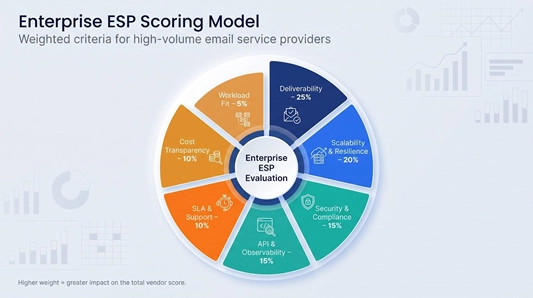
Methodology matters. Before reading a sales page, we built a seven-point scorecard weighted to what enterprise senders value most:
- Deliverability controls and evidence (25 %)
- Scalability under burst traffic (20 %)
- Security, compliance, and data governance (15 %)
- API, SMTP, and observability depth (15 %)
- SLA terms and support escalation (10 %)
- Total cost of ownership transparency (10 %)
- Workload fit for transactional, marketing, or multitenant SaaS (5 %)
Each provider earned 1-5 points per criterion. We multiplied the score by its weight to reach a composite total. Missing public proof, such as a current SOC 2 letter or documented throughput figure, lowered the score.
This evidence-first rubric keeps “best email service providers for high-volume and enterprise senders” comparisons consistent, no matter how slick a landing page looks.
1. Inclusion gate: who qualifies
A provider had to pass all eight checks below to reach our comparison sheet:
- Public SMTP or REST API (no sales-only credentials).
- Documented enterprise capacity or customers sending ≥ 1 million emails a month.
- Custom-domain SPF, DKIM, and DMARC.
- Programmatic bounce or complaint feeds.
- Reputation isolation (managed pools, dedicated IPs, or workload routing).
- Searchable logs and webhooks that trace a message end to end.
- Published anti-spam policy aligned with CAN-SPAM and GDPR.
- Verifiable current ownership (no dormant code or rename limbo).
Exactly eight platforms cleared the bar. Mailbox hosts, cold-email tools, and martech suites did not.
Our weighted scoring model
Raw feature counts can hide real-world gaps, so we weighted seven criteria according to what matters most when you send millions of emails a month:
|
Criterion |
Weight |
Why it matters |
|
Deliverability controls & evidence |
25 % |
Keeps messages out of the spam folder and holds Gmail complaints below 0.3 %. |
|
Scalability, throughput & resilience |
20 % |
Proves the platform can accept a burst of one million messages without queue backlogs. |
|
Security, compliance & data governance |
15 % |
Meets SOC 2, ISO 27001, and (where required) BAA terms for HIPAA. |
|
API, SMTP & observability |
15 % |
Lets engineers trace every message from API call to inbox in seconds. |
|
SLA, support & deliverability services |
10 % |
Provides documented response times and escalation paths. |
|
Cost & total-cost transparency |
10 % |
Surfaces overages, dedicated-IP fees, and retention charges early. |
|
Workload fit |
5 % |
Aligns with transactional, marketing, or multitenant SaaS needs without work-arounds. |
Scoring rubric
- 5 = documented evidence meets or exceeds enterprise benchmarks
- 3 = partial coverage or evidence limited to marketing claims
- 1 = capability missing or undocumented
We multiplied each 1-5 score by its weight to produce a composite total for every vendor. Missing public proof, such as a current SOC 2 letter, automatically reduced a score. The result is a transparent, repeatable matrix you can adapt to your own “best email service providers for high-volume and enterprise senders” RFP.
Why we compare costs at one million sends
Pricing pages can mislead. One provider touts “10K free,” another quotes fractions of a cent, and a third folds transport fees into a broad marketing suite.
To create like-for-like numbers, we priced every platform at the same benchmark: one million outbound emails in a single U.S. region, steady volume plus a modest campaign burst.
Why one million?
- Below that level, free tiers and shared pools hide real infrastructure limits.
- Above it, extras such as dedicated IPs, address validation, premium support, and log retention can outweigh the headline cost per thousand (CPM).
Normalisation checklist for each provider
- Select the published tier, or sales quote, nearest one million messages.
- Add the essentials for an enterprise footprint: at least one dedicated IP, 30-day log retention, and priority support if sold separately.
- Apply overage rates when the tier caps volume below one million.
- Exclude extras like SMS credits or CRM seats unless they are bundled and unavoidable.
- For Amazon SES, keep regional data-egress and AWS transit fees in scope, because Finance still sees those charges.
The result is an all-in effective cost per thousand (eCPM) you can plug into forecasts before negotiations begin. This lens is critical when comparing the best email service providers for high-volume and enterprise senders.
1. Mailgun: best overall for enterprise-grade SLAs
Mailgun positions itself as an email backbone you can trust at peak load. Its Rapid Fire Throughput SLA accepts up to 72 million API requests per hour, and the platform advertises a 99.99 percent uptime SLA that covers server availability, message acceptance, and, on higher plans, delivery-attempt latency.
Security and compliance match that scale. The company holds SOC 2 Type II and ISO 27001 certificates, supports SAML-based SSO, and will discuss HIPAA workloads and a Business Associate Agreement on Enterprise terms (confirm with sales). Customers can choose U.S. or EU data residency and set custom log-retention windows to meet regional privacy rules.
From a developer view, the REST API, SMTP fallback, and real-time webhooks (deliveries, opens, clicks, bounces, complaints) share unified message IDs. Tracing one email from request to inbox takes minutes, not a forensic project.
Deliverability tools come baked in. Teams can pre-validate addresses, warm dedicated IPs with expert guidance, and monitor inbox placement without third-party seed lists. Shared pools suit steady senders; dedicated IPs are available from the Foundation plan up, the Scale plan includes one, and Enterprise adds dedicated IP pools.
Pricing blends a base subscription with published overages ($1.10 per thousand on the Scale plan) until you cross into custom Enterprise volume, where million-send rates are negotiated. That CPM beats few rivals on paper, but integrated monitoring, warm-up automation, and compliance evidence often save engineering hours elsewhere.
If your board wants a single vendor with contractual uptime, documented throughput, and audited security controls, Mailgun tops the shortlist, especially for teams without an in-house MTA crew.
2. Amazon SES: best for rock-bottom send cost at cloud scale
Amazon Simple Email Service (SES) still posts the lowest list price among the eight: $0.16 for every 1,000 messages on the Essentials plan, falling to $0.14 past 10 million and $0.11 past 100 million, pay-as-you-go. No minimum volume, no long-term contract. You pay only for what you send, mirroring the rest of AWS.
The catch: SES is infrastructure, not a fully packaged ESP. Teams must create IAM roles, build configuration sets, stream events into CloudWatch or S3, and script IP warm-up if they choose dedicated space.
Plan packaging (September 2026)
|
Plan |
Key additions |
Base send rate |
|
Essentials |
Classic pay-as-you-go |
$0.16 / 1,000 (0 to 10M) |
|
Pro |
Virtual Deliverability Manager included |
$0.22 / 1,000 |
|
Enterprise |
Multiregion resilience, workload-level reputation isolation, annual deliverability assessment |
$0.23 / 1,000 |
Quotas and dedicated IPs
- New accounts start with conservative daily and per-second limits; raising them requires an abuse-desk review. Plan two to three weeks ahead.
- Managed dedicated IPs carry a $15 per-month account fee plus $0.08 / 1 000 emails on the first tier, still under 0.2 ¢ per message at the one-million mark.
- BYOIP and leased blocks are also available, but warm-up remains self-managed.
Support considerations
If your company already funds AWS Enterprise Support, SES incidents route to the same 24 × 7 engineers. Without that umbrella, you rely on documentation and community forums, which are thorough but lack the opinionated deliverability coaching some marketers expect.
Fit
SES excels when a DevOps team is already all-in on AWS and prefers scripting suppression handling over paying higher CPMs for convenience. For organisations without that bench strength, factor extra hours, plus a monitoring budget, into the true cost of ownership before naming SES the cheapest option among the best email service providers for high-volume and enterprise senders.
3. Twilio SendGrid: best mix of API power and marketer-friendly tools
SendGrid speaks to two audiences. Developers integrate through a mature REST API and SMTP relay. Marketers build segments, visual workflows, and A/B tests in the same console, a rare combination among the best email service providers for high-volume and enterprise senders.
Scale and reputation control
Twilio reports delivering more than 205 billion emails a month across its network (self-reported, 2026). New customers start on vetted shared IP pools, then move to a dedicated IP on the Pro tier and above, with automated warm-up available on paid plans (confirm the current volume floor with sales).
Support tiers
- Essentials / Pro: ticket queues, no named contact
- Premier: named technical success manager, priority routing, and faster resolutions when latency costs revenue
Security and compliance
SOC 2 Type II, ISO 27001, and GDPR coverage come standard. SAML SSO unlocks above Essentials. HIPAA support is contract-based and limited to transactional traffic; confirm stream scope before sending PHI.
Pricing signals
Published plans include flat monthly caps plus overage blocks, but million-send quotes vary with dedicated IP count, validation credits, and deliverability consulting. Add those items to any board-level CPM model.
Ideal fit
Choose SendGrid when one team owns engineering and marketing or when sub-accounts must separate brands under a single umbrella. If you only need fire-and-forget transactional mail, you’ll pay for marketing features you never open. If you want one console for receipts, newsletters, and growth automation, SendGrid is hard to match.
4. Bird Email (formerly SparkPost): best for mega-scale sending and deep analytics
Born from SparkPost’s developer roots and rebranded after MessageBird’s 2021 acquisition, Bird Email positions itself as an enterprise control tower: high-volume delivery plus predictive insight.
Scale and reliability
Bird says about 40 percent of the world’s commercial email transits its network and that it processed 19.9 billion emails over Black Friday weekend 2025 (self-reported), and its public status page tracks SMTP and API components across U.S. and EU clusters. Global retailers sustain double-digit millions per hour without queue backlogs.
Signals analytics
The Signals layer ingests engagement data across the customer base, benchmarks your domains, and flags anomalies such as rising complaints, slipping Microsoft reputation, or missing one-click unsubscribe headers before those issues reach support dashboards.
Security and compliance
- SOC 2 Type II and ISO 27001 certificates
- Optional regional data routing to keep logs inside the EU
- HIPAA eligibility is contract-based; confirm scope during procurement
Pricing and contracts
Above 3 million sends per month, pricing is custom and often paired with multi-year terms. Dedicated IP blocks, Signals add-ons, and deliverability services bundle into those quotes, so itemise each line before signing.
Implementation note
The SparkPost ↔ Bird name change still appears in SDKs and docs. Specify which dashboard or API you reference in support tickets to avoid delays.
Bird excels when email revenue is material and forward-looking insight, not merely uptime, protects that revenue. For senders at multi-billion annual volume, the predictive analytics can justify the custom contract.
5. Postmark: best choice for mission-critical transactional email
Postmark’s promise is speed you can verify. Postmark publishes a live status page with time-to-inbox tracking per mailbox provider, so you can verify delivery speed yourself before signing. Few ESPs publish latency charts alongside uptime.
Built for separation
Each workload lives in its own message stream (transactional or broadcast) with unique API tokens, templates, suppressions, and, when volume justifies, dedicated IPs. A midnight promotion can’t derail password-reset reputation.
- Dedicated IPs become available at 300 000+ emails per month; below that, you stay on curated shared pools optimized for high-engagement transactional cadence.
- Postmark warms and monitors dedicated ranges automatically, so engineers skip ISP-specific throttle scripts.
Security and compliance
GDPR support, TLS, DKIM, SPF and DMARC tooling, and configurable retention place Postmark on solid footing for most workloads, but it is not HIPAA-compliant and will not sign a BAA, so keep PHI off the platform. Teams can shorten log retention to meet stricter privacy rules.
Pricing snapshot (US region)
- $15 for the first 10 000 messages
- $1.80 per 1 000 on the Basic tier thereafter
Higher plans lower the eCPM, but at the one-million mark you will spend more than Amazon SES or SendGrid, an intentional premium for documented low-latency delivery.
Fit
Choose Postmark when customer experience hinges on fast, predictable inbox arrival, and bulk marketing can run elsewhere (or in a separate Postmark broadcast stream). Your support desk and security team will trade a marginal CPM premium for fewer “where’s my code?” tickets.
6. Resend: best developer experience for modern stacks
Resend feels like it was built by engineers for engineers. The JSON API mirrors familiar DevOps tools, and official SDKs cover TypeScript, Go, Python, Ruby, and Rust. Front-end teams using React Email can render templates locally, removing MJML builds from CI.
Performance and uptime
Paid plans impose no daily cap. Enterprise tiers publish a 99.99 % uptime SLA and allow custom rate limits.
Dedicated IPs
Add-on eligibility starts at 3,000 emails per day on the Scale plan, $30 per month per IP. Warm-up is automated, and traffic can be tagged to separate marketing and transactional streams.
Security and compliance
- SOC 2 Type II and GDPR compliance
- SSO/RBAC for teams
- Resend is not HIPAA compliant and does not sign BAAs, so do not send protected health information.
Pricing snapshot (US region)
- $825 for 1.5 million emails (≈ $0.55 / 1 000)
- Custom quotes above 2.5 million
The CPM sits between Postmark and SendGrid, higher than SES, but you pay for a streamlined DX and built-in tooling rather than raw transport.
Workflow advantages
Webhooks mirror the send-response schema, failed jobs can be replayed from the UI, and environments clone with one click. These touches save debug time every sprint.
Choose Resend if rapid iteration, infrastructure-as-code, and modern frameworks matter more to your team than older deliverability folklore. For green-field SaaS projects, the time saved shipping email features often outweighs the marginal CPM premium.
7. Brevo (formerly Sendinblue): best all-in-one marketing + transactional platform
Brevo targets teams that want newsletters, lifecycle automation, CRM, SMS, WhatsApp, and receipt emails in one login.
Plan line-up
|
Plan |
Monthly email volume |
Indicative price* |
|
Free |
9,000 (300/day) |
$0 |
|
Starter |
From 5,000 |
From $9 |
|
Standard |
Scales with volume |
From $18 |
|
Professional |
From 150,000 |
From $499 |
|
Enterprise |
Custom volume |
Custom |
*Prices from brevo.com, September 2026; email volume on Starter and Standard is sold in blocks, so the monthly fee rises with volume.
Professional and Enterprise tiers bundle dedicated IPs, advanced segmentation, and priority support. Enterprise also adds custom SLAs and multi-user rights management.
Unified but separated
- The transactional engine runs on the same SMTP/API stack as campaigns, but you can assign separate subdomains, suppression lists, and dedicated IPs to keep reputations apart.
- Shared pools are tuned for marketing cadence; Enterprise customers receive guided warm-up for dedicated ranges.
- Engagement dashboards surface opens, clicks, and global suppression health in one view, reducing cross-team finger-pointing.
Compliance notes
GDPR and SOC frameworks are documented, and data centres operate in both the EU and US. Brevo does not advertise HIPAA coverage; ask before sending PHI. Region-locking message data requires a contract rider, so regulated senders should confirm scope before signing.
Cost lens
Brevo may look pricey on a pure CPM basis, but the math changes when CRM seats, SMS volume, and landing-page builders replace separate SaaS tools. Budget Brevo when stakeholder sprawl matters more than sub-cent transport fees and one console beats best-of-breed point products.
Choose Brevo if your marketing, product, and retention teams prefer a single platform and you can trade some raw-API speed for integrated automation and multichannel reach.
8. Mailtrap: best bridge from QA sandbox to production sending
Mailtrap began as a developer sandbox that catches staging emails. It later added production sending, so the same code can route to production SMTP or REST clusters without new credentials.
Workflow
- Point non-production traffic to the Mailtrap inbox and inspect headers, HTML rendering, and SPF alignment.
- Promote the build; Mailtrap’s router then delivers through transactional or bulk clusters, each with separate webhooks, rate limits, and suppression lists, so a newsletter never delays a password reset.
Performance and evidence
Burst and SLA figures are not yet public. A vendor blog (June 2026) reported 78.8 % inbox placement on shared IPs, but the sample size was undisclosed; treat the metric as directional until an independent seed test is published.
Enterprise options
- Dedicated IPs, SSO, extended log retention, and priority support are add-ons.
- Self-service plans start at $15 per month, Business runs $85 to $450, and the published Enterprise tier is $750 per month for 1.5 million sends ($1,250 for 2.5 million), with custom pricing above that.
Fit
Dev-first teams that already QA email headers and variables in staging can remove an entire “it-worked-locally” class of incidents by promoting the same provider to production. Mailtrap is strongest where release pipelines spin up disposable environments and email testing is part of every pull request.
How to choose the right enterprise ESP
1. Map your workloads
List every message your business ships (password resets, balance alerts, newsletters, tenant-level SaaS traffic). Sort them into three buckets:
|
Bucket |
Examples |
Blast-radius question |
|
Critical transactional |
MFA codes, billing notices |
What happens to revenue or trust if delivery slips by 60 s? |
|
Routine transactional |
Shipping updates, reminders |
How spiky is the daily volume? |
|
Bulk / promotional |
Campaigns, product launches |
Can a spike double typical traffic? |
If critical traffic forms a small but high-stakes slice, prioritise providers with under 1 s queue latency and written 99.99 % SLAs, even at a higher CPM.
2. Calculate total cost of ownership
Start with the 1 M-send quote, then add hidden lines:
- Dedicated IPs: $20-$100 per month + per-thousand surcharges
- Overages: often 2× base CPM
- Address validation, inbox tests, warm-up tools
- Log retention beyond 30 days
- 24 × 7 support escalation
- Cloud egress fees (e.g., AWS)
Make spreadsheet rows = providers and columns = cost buckets. Apply 10 % monthly growth and see who stays cheap at scale.
3. Decide on IP strategy
Shared pools: zero fee, pre-warmed reputation, ideal below 100 000 emails/day.
Dedicated IPs: control and allowlists but require ≥ 3 000-5 000 emails/day to stay warm.
Quick rules:
- Can’t meet the daily floor? Stay shared and monitor pool health.
- Going dedicated? Ask who owns warm-up, throttle rules per mailbox provider, and intervention thresholds.
4. Isolate message streams
Give each workload its own subdomain, configuration set, and, if volume justifies, IP pool. Postmark enforces streams by design; SendGrid uses sub-users; Mailgun tags traffic; SES binds metrics to configuration sets.
5. Vet support before a crisis
Open two tickets now, one low and one urgent. Measure:
- Initial-response target in minutes
- Named CSM vs. rotating pool
- After-hours phone bridge
- RCA depth (timeline, impact graph, preventive action)
6. Confirm security and compliance evidence
Collect under NDA:
- Current SOC 2 Type II letter
- ISO 27001 (and 27701) certificates
- DPA plus sub-processor list
- Region diagrams and failover design
- BAA template (if you handle PHI)
- Pen-test executive summary
If any item is unavailable, move on.
7. Test portability and lock-in
Export templates, suppressions, and event logs; import them into a blank sheet: how messy is the schema? Re-point DNS to a warmed backup ESP and send 5 000 seed messages; compare time-to-inbox and complaint rates. Check webhook field parity; if your transform script passes 20 lines, note the future tax.
8. Run a 30-day proof-of-concept
Week 1: create 2-3 finalist accounts under the same authenticated subdomain and mirror IP strategy.
Weeks 2-3: route 10-15 % live traffic; log p50/p95 API latency, queue delay, first-delivery time, and inbox rate.
Week 4: double peak rate for one hour, revoke an API key, and force a webhook timeout; record support response and retries.
Pass criteria: zero lost messages, under 0.1 % Gmail complaints, complete webhooks, SLA met. Any provider that fails exits the race.
One month of measured data beats months of slide decks. Use it to select the best email service provider for high-volume and enterprise senders with confidence.
Gmail, Yahoo, and Microsoft compliance checklist
Since early 2024 Gmail rejects or throttles any sender that reaches 5 000+ consumer Gmail recipients in 24 hours without aligned SPF, DKIM, and DMARC. Yahoo applies comparable rules (no public numeric threshold), and Microsoft tightened authentication standards for Outlook.com/Hotmail in May 2025.
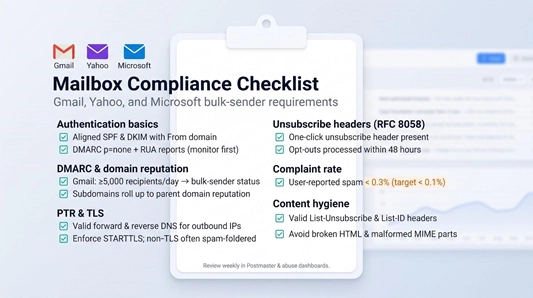
Use the checklist below before you switch on a new ESP:
- Authentication basics
- Publish SPF and DKIM that align with the visible From
- Add a DMARC record set to p=none plus a valid rua= mailbox; watch reports for seven days before enforcing.
- DMARC alignment
Gmail aggregates subdomains: if news.example.com reaches 5 000 recipients today, the entire example.com tree is classed as a bulk sender.
- PTR and TLS
Every outbound IP needs matching forward and reverse DNS, and the ESP must advertise STARTTLS. Mail without TLS is now routinely spam-foldered or rejected.
- One-click unsubscribe (RFC 8058)
Marketing messages must include the header and a working HTTP endpoint that processes opt-outs within 48 hours. Test with a live Gmail inbox; Google’s crawler will follow the link.
- Complaint rate
Keep user-reported spam below 0.3 % (target < 0.1 % for headroom).
- Content hygiene
Add valid List-Unsubscribe and List-ID headers, and avoid malformed MIME parts; Gmail filters penalise broken HTML faster than ever.
During onboarding, walk through each item with your ESP’s support team. Once traffic flows, review Google Postmaster Tools, Microsoft SNDS, and the Yahoo Complaint Feedback Loop weekly. Staying ahead of policy shifts keeps deliverability crises off your incident list.
Hidden risks buyers often overlook
A polished dashboard can hide structural cracks that surface only under pressure. Flag these seven issues before you sign:
Shared-IP contamination
In a pool you inherit every neighbor’s reputation. Ask for health metrics and documented eviction rules.
Low-volume dedicated IPs
Sending 20 000 emails one week and zero the next looks like inactivity to Gmail. Below 3 000-5 000 emails/day, a vetted shared pool often outperforms a lonely IP.
Uncapped overages
Providers such as Mailgun and SES bill every extra 1 000 messages. A bot signup storm can turn a $100 forecast into $250+ overnight, so add hard alerts or spend caps.
Account suspension triggers
Anti-abuse bots may pause sending after a spike in complaints or unknown users. Verify the appeal path and keep a warmed backup route ready.
Conditional HIPAA claims
“HIPAA-ready” usually means Enterprise tier, a signed BAA, and strict encryption settings; logs or message bodies may remain out of scope. Confirm every covered component.
Message-log retention
Default windows can be 5-14 days, while auditors often need 180 days. Longer storage may cost extra or be unavailable.
AI and data privacy
Send-time optimisation models often train on aggregate recipient behavior. Confirm whether your data feeds another customer’s algorithm and whether an opt-out exists.
Frequently asked questions
Is SMTP alone enough for enterprise email?
No. SMTP moves packets, not programs. You still need queues, retries, suppressions, aligned authentication, and monitoring: the functions an enterprise ESP provides so your ops team does not rebuild them.
How do we pass Gmail’s bulk-sender rules?
Align SPF and DKIM with the From domain, publish a monitoring-mode DMARC record (p=none), serve TLS, add RFC 8058 one-click unsubscribe, and keep user-reported spam below 0.3 percent (aim for < 0.1 percent).
Can we use one provider for both marketing and transactional mail?
Yes, but place each workload on separate streams, subdomains, and, if volume justifies, IP pools so a promotion never throttles password resets.
When does a dedicated IP make sense?
Only when you send a steady 30 000-50 000+ emails per day. Below that threshold, a well-managed shared pool usually lands in the inbox more often.
Why is Amazon SES so cheap?
AWS sells raw transport at $0.16 per 1,000 emails on Essentials. You supply warm-up, monitoring, template storage, and deliverability expertise, or you pay for add-ons like Virtual Deliverability Manager.
Do we need a second ESP for fail-over?
If revenue depends on authentication or security codes, yes. Pre-warm the backup route and sync suppressions so the cure does not create new blocks.
Can any provider promise inbox placement?
No. ESPs control delivery attempts, not mailbox-provider filtering. They can only promise uptime, queue acceptance, and support response.
What does 99.99 % uptime buy us?
About 52.6 minutes of allowed downtime per year. It says nothing about latency spikes, spam-folder detours, or other quality metrics. Monitor those separately.
Is a “HIPAA-compliant” ESP automatically safe for PHI?
Not until you sign a BAA, enable encryption in transit and at rest, and limit message content to essential PHI.
Should we request IPv6 support?
If your roadmap includes dual-stack networking or IP allowlists, yes. Confirm reverse DNS, warm-up strategy, and an IPv4 fallback for recipient domains that mishandle IPv6.
Future outlook: tighter authentication, operational AI, and multicloud resilience
- Authentication moves from “best effort” to mandatory
More mailbox providers are expected to follow Gmail’s 2024 rule: aligned SPF, DKIM, and DMARC plus one-click unsubscribe for any sender topping 5 000 consumer-mail recipients per day. Enforcement will likely extend from the domain level to individual subdomains and message streams, forcing stricter separation between transactional and marketing traffic. - Reputation goes granular
Scoring already happens at IP and domain levels; next comes tenant-level metrics inside multitenant SaaS and even per-cohort scoring. Precise targeting will be rewarded, while shared pools that host “spray and pray” lists will lose reach faster. - AI shifts from copywriting to live operations
Expect models that watch complaint curves in real time and automatically throttle or swap IP pools before filters react. Buyers will need audit trails that document what data trains the model, whether you can opt out, and whether a manual override exists. - Multicloud fail-over becomes a checkbox
Password-reset traffic cannot wait for a status-page update. Enterprise RFPs will call for dual DNS, synchronised suppression lists, and IaC templates that rotate ESP API keys in seconds. - Transparent TCO wins deals
After headline surprises with overages and retention fees, procurement teams will push for spend caps, itemised billing, and real-time usage dashboards. Providers that still hide CPM details behind “contact sales” risk longer sales cycles. - IPv6 finally matters
Roughly half of consumer traffic to Google now arrives over IPv6 (Google IPv6 statistics). Governments and telcos now ask whether outbound dual-stack with proper rDNS is available and whether dedicated v6 ranges can be isolated for reputation monitoring.
Conclusion
Each of the eight providers wins in its own lane: Mailgun for written SLAs, Amazon SES for raw transport cost, Twilio SendGrid for API power with marketer tools, Bird Email for mega-scale analytics, Postmark for latency-critical transactional mail, Resend for developer experience, Brevo for a unified platform, and Mailtrap for the path from testing to production. Do not choose on headline CPM. Price every finalist at one million sends with dedicated IPs, log retention, and support included, then confirm SOC 2 evidence, DMARC alignment, and a complaint rate under 0.3 percent. Isolate your message streams and run the 30-day proof of concept before you sign. Treat email like any other critical service, and you gain a measurable edge as these shifts accelerate.




















Comments