>>
Technology>>
Software>>
How To Choose The Right Softwa...How To Choose The Right Software For LED Screen Presentations At Events
The Silicon Review
20 March, 2026
Author:
The Silicon Review Team
The visual experience makes the biggest impression. When you use large screens, the software running them determines how smoothly your media plays. Choosing the right program means balancing ease of use with powerful playback features.
Getting the settings right prevents technical glitches and keeps your audience focused on the message. You need a solution that fits your specific event goals and technical skill level.
Mapping Your Event Vision And Hardware Needs
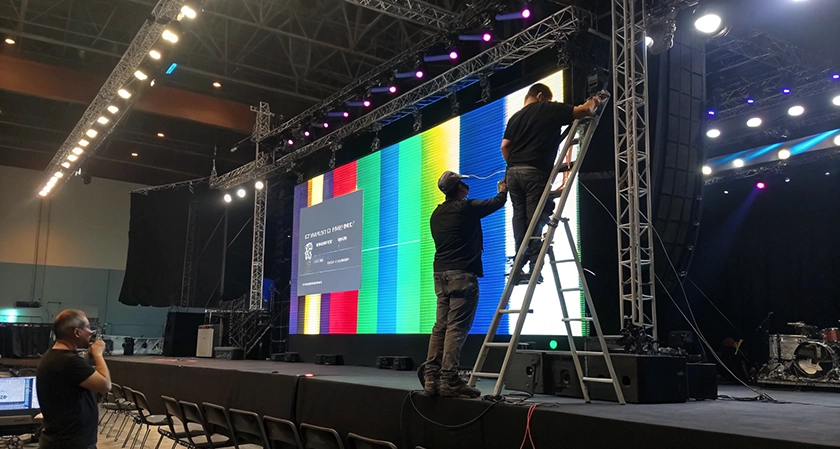
Planning the layout requires a firm understanding of the physical space. Before you purchase a LED video wall for a specific venue, find the right supplier and plan out the hardware specs. Matching pixel counts prevents blurry images or stretched graphics during the show.
Verify that your controller supports the software interface you plan to use. Reliable connections keep the signal strong across long cable runs. Software interfaces vary in complexity from simple slide players to professional media servers. Simple tools work well for static images or basic video loops.
Market Growth And New Professional Standards
The industry for these displays is seeing a massive surge in investment and development. The LED display sector is set to grow by $4.25 billion through 2029. High demand for better visuals drives developers to create more user-friendly tools.
Industry experts expect an annual growth rate of 8.8% for this technology. Increased spending means more frequent updates and better customer support for the programs you buy. New features may include better color calibration and improved frame synchronization. Staying updated on these trends helps you pick a tool that will not become obsolete next year.
Digital Signage And The Power Of Branding
Software choice depends on whether you are running a live show or a continuous loop. Digital signage now makes up over 40% of total market revenue. Companies are moving toward digital branding to stay flexible and cut down on printing costs.
Your software should allow for quick updates to logos and sponsor lists. Real-time changes keep the content fresh without requiring a full system reboot. High-end programs can even pull data from external sources to show live updates or social media feeds.
Branding consistency is easier to maintain with professional templates. Set specific color profiles to match a company's exact brand standards. Consistency across multiple screens creates a unified look throughout your event space.
Centralizing Workflows For Seamless Production
Managing multiple media sources can get messy if you use separate tools for every task. The best approach is to centralize every workflow into one all-in-one platform. Combining scheduling and playback reduces the risk of human error during a live presentation.
Single platforms let your team monitor everything from one screen. Less jumping between windows means faster response times if a file fails to load. You can see the health of your media players and the signal status at a glance.
Strategic Advantages And Future Event Features
Looking ahead to the next few years helps you pick a tool with staying power. You want a system that supports interactive elements and high-definition media. 8K screens are becoming a standard for global concerts and high-end malls. To handle high resolutions, your software needs powerful processing capabilities.
Look for the following features when evaluating a new program:
- Low latency for live camera feeds
- Multiple-layer support for complex graphics
- Remote management capabilities
- Native playback for 4K and 8K files
- Integrated backup systems for stability
Advanced software handles the heavy lifting so you can focus on the creative side. It makes it easier to build complex timelines with various types of media.
Scaling Performance With Modern Media Players
Automated triggers can sync lights and sound with your screen content. Reliable media players and templates make promoting events much easier. Having pre-built layouts saves hours of work during the design phase.
Remote management tools allow you to change content from a laptop anywhere in the room. You do not need to be physically connected to the screen to make a quick fix. This flexibility can be helpful during busy rehearsals where every minute counts.
Refresh Rates And Visual Clarity For Broadcast
If your event is being filmed or streamed, screen flickers can ruin the recording. Specialists recommend using hardware and software that support 3840Hz or higher for professional camera work. High refresh rate keeps the image stable on screen and on film.
Match your software settings to the panel capabilities. Smooth motion looks much better for high-speed video or fast-moving graphics. High-performance software prevents the tearing effect that happens when frames do not align perfectly.
Choosing software is about finding the right balance between power and simplicity. Your tools should disappear into the background so your content can shine. Testing your setup before the doors open is the only way to find potential bottlenecks.
Once the software is dialed in, your presentation will look polished and professional. A great visual show leaves a lasting memory on every guest in the room. Focus on the user experience, and the results will speak for themselves.