>>
Industry>>
Fintech and Financial Services>>
4 Day Trading Simulator for Pr...FINTECH AND FINANCIAL SERVICES
4 Day Trading Simulator for Practice Platforms Compared: Free & Realistic Picks

The Silicon Review
06 March, 2026
Author:
The Silicon Review Team
Millions of new traders have opened “paper” accounts since 2024. One simulator already serves more than 3.5 million users, proving that practice mode is now the on-ramp to live trading (a 2024 Small Business World Journal report).
Still, most round-ups feel like board games—not trading floors. You deserve screens that match live speed, depth, and emotion without margin calls.
This guide pits four no-cost simulators that stream real-time quotes, offer instant cash resets, and teach risk management through the same order tickets you’ll use with real money.
Chart-replay modes, AI screeners, and social leaderboards now blend naturally with education resources. If you want a deeper look at how modern tools fuse learning and execution, the Fintech aspect of Trading offers a solid primer early in your journey.
To choose our contenders we kept five non-negotiables: each platform is free to start, streams current market quotes, lets you refill virtual buying power on demand, shipped meaningful updates between 2024 and 2026, and spans more than one asset class. We’ll cover strengths, rough edges, and the trader profile each one suits best—so you leave with a first step instead of another open tab.
Ready? Let’s trade without the bruises.
How we chose these four platforms
First, every simulator streams live or near-live market quotes. Delayed feeds may teach chart patterns, but they miss the split-second reality day trading demands.
Second, the entry price is zero. A free tier with no expiry or credit-card hoops lets you practice at your own pace and bankroll.
Third, we required a quick-reset button plus risk metrics. Blowing up play money only helps when you can reload funds and review what went wrong.
One practical way to run that review is with the free trading-journal template from N P Financials, which bakes in a concise “3-5-7” rule: risk a maximum 3 percent of capital, hold for no more than five candles on your chosen timeframe, then grade the trade in a seven-day audit.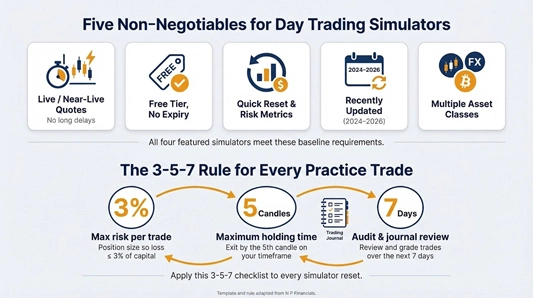
To see how that 3-5-7 checklist scales into a complete intraday game plan—including structured one-on-one drills and live-market walk-throughs—the Fintech aspect of Trading course distills N P Financials’ nine-hour curriculum into repeatable routines you can plug straight into any simulator.
Plugging this checklist into your next sim reset forces accountability before you chase the next setup.
Fourth, recent updates matter. Each platform rolled out meaningful features between 2024 and 2026; that track record shows the team is still listening, fixing, and improving.
Finally, breadth counts. We favored simulators that handle more than one asset class (stocks, options, sometimes futures or crypto) so you can refine a strategy and then pivot without learning a new interface.
With the ground rules set, let’s open the first trading terminal.
1. Thinkorswim “paperMoney”
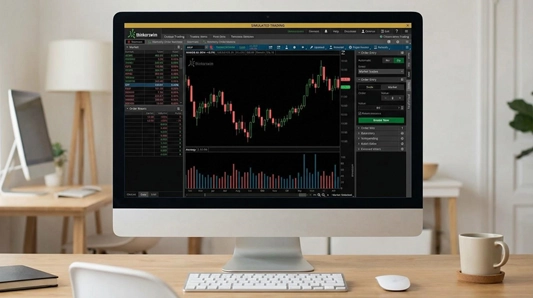
Thinkorswim paperMoney desktop trading simulator interface screenshot
Fire up Thinkorswim and you step into the cockpit traders use on earnings mornings: multi-monitor charts, hot-keyed order tickets, even depth-of-market ladders. The only difference is the cash is virtual, so your heart rate stays in the green while you learn.
Thinkorswim’s “paperMoney” account mirrors the live platform pixel for pixel. We’re talking tick-by-tick price updates, options chains that refresh in real time, and Level II data for equities once you turn it on. Place a market order and watch it fill at the current national best bid or offer; route a bracket order and the brackets move with price as if dollars were on the line.
The desktop install is hefty, yet it unlocks tools most free simulators skip. OnDemand playback lets you rewind any trading day back to 2009, hit play at 8:30 am, and trade the open as if it were happening now. Risk analysis tabs chart potential profit and loss across complex option spreads so you can stress-test before you ever click Buy.
A quick-reset button reloads a fresh hundred thousand in virtual buying power. Blow up, pause, reflect, then reload. That loop turns embarrassing mistakes into muscle memory instead of tuition fees.
Who thrives here? Anyone planning to trade options or futures once they go live. Thinkorswim’s tool set is dense, so beginners should budget time for YouTube tutorials or TD Ameritrade walkthroughs. Yet the learning curve is the price of precision. Master this cockpit and every other simulator on today’s list will feel like flying coach.
Ready to taxi to the next runway? Let’s see how a browser-based rival keeps things light without sacrificing realism.
2. TradingView paper trading + Bar Replay
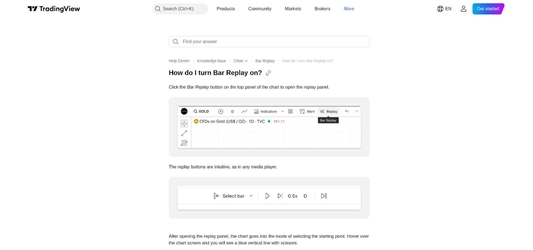
TradingView paper trading and Bar Replay interface screenshot
Open a browser tab, sign in with Google, and you’re charting Tesla in under thirty seconds. TradingView proves that serious practice doesn’t require a desktop download or advanced setup.
The platform’s chart engine is the star. Candles glide smoothly, indicators snap into place, and you can drag entries straight onto the graph. Click “Paper Trading,” and the order ticket appears with the same fields you’ll meet on a live broker: market, limit, stop, quantity, time in force. Press Buy and watch the position fill; an account window tracks equity, margin, and running profit in real time.
Need to replay last year’s CPI gap? Hit Bar Replay, slide the timeline back, and watch each candle print as you trade the rewind. The feature turns quiet evenings into discipline drills.
Free members get Cboe BZX equities in real time and crypto quotes around the clock. Other exchanges arrive with a slight delay, yet that gap rarely hurts pattern drills. You can add paid data bundles later without switching platforms—a plus if you plan to place live orders.
The social layer adds extra value. Thousands of published strategies and indicator scripts sit one click away, so you can borrow a moving-average crossover, tweak the settings, and test it on replay before risking a dollar. It feels like a buzzing trading pit, except the crowd is global and code-friendly.
If you want a lightweight cockpit and enjoy charting on your phone during lunch, TradingView is a solid co-pilot. Let’s shift from the browser to mobile and see how a challenger gamifies practice with live leaderboards.
3. Moomoo paper trading & global challenge
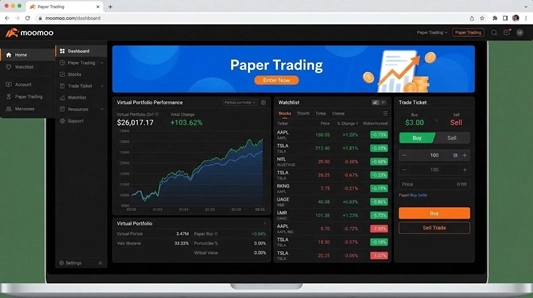
Moomoo mobile paper trading challenge leaderboard screenshot
Moomoo brings the trading floor to your phone and wraps it in a friendly, playful interface. Tap the orange toggle in the account tab and your live brokerage app flips into a paper environment stocked with one million virtual dollars. Quotes still stream in real time, so every bid, ask, and spike mirrors the cash market.
The standout feature is the competition layer. Several times a year, Moomoo runs a global paper-trading challenge that ranks every simulated account on daily return and max drawdown. Leaderboards refresh by the second, chat rooms pulse with strategy talk, and winners collect prizes or equity-research subscriptions. It feels like a season of esports, except you’re building trading discipline instead of racking up headshots.
Under the hood, Level II quotes on Nasdaq stocks, options chains, and after-hours sessions stay free during promotions. You can practice scalping the open or swing-trading earnings gaps without paying for data feeds. A swipe-to-order ticket streamlines entries, useful for commuters who squeeze practice reps between train stops.
The platform’s social DNA offers instant feedback. Post a screenshot of your morning trade, and seasoned users often chime in with risk tweaks or chart annotations. It’s peer review in your pocket, and it shortens the lonely hours most new traders spend second-guessing themselves.
Moomoo isn’t flawless. Futures and exotic options remain on the roadmap, and the desktop beta trails the mobile app. Yet for anyone who learns best by sparring against real-time rankings, and wants those adrenaline spikes without real capital, this simulator lands a solid punch.
Next up, we leave the leaderboard arena and step into a veteran desktop platform built for order-routing purists.
4. TradeStation desktop simulator
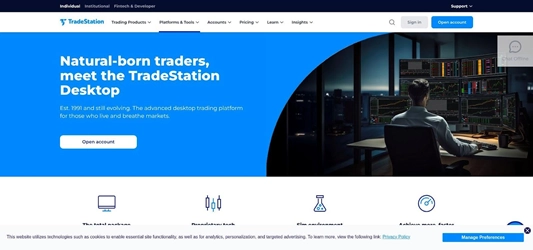
TradeStation desktop simulator Matrix and charting workspace screenshot
TradeStation stands out among desktop trading suites. Its simulator lives inside the same platform pros use for live orders, so every hotkey, analytic window, and routing option is exactly where you’ll find it on game day.
Launch the sim and you receive unlimited virtual buying power. Size up a ten-lot futures scalp or leg into a complex options butterfly without a warning that you’ve maxed out fake funds. Filled orders respect depth of market and route preferences, training you to think about slippage long before real fills sting.
Charting is where TradeStation shines. Nearly three hundred built-in indicators pair with EasyLanguage scripts, letting you code a breakout algorithm in plain English, click Verify, and paper-trade it in minutes. Matrix view shows time-and-sales tape beside a vertical ladder, perfect for reading order flow during the morning rush.
One catch: the simulator is free only after you open and fund a brokerage account. Most traders deposit the minimum, treat it as locked-away tuition, and then grind in sim until their playbook holds up under pressure. According to a 2025 roundup by DayTradingComputers, the desktop-only setup “offers unlimited paper-trading funds” and remains a top choice for traders who need deep analytics before they risk cash.
If you value low-latency execution, granular order types, and code-friendly strategy testing, TradeStation is the final exam. Pass here and you can step into live markets with fewer surprises.
With our four contenders reviewed, let’s land the plane and map out your next moves.
Comparing the four simulators at a glance
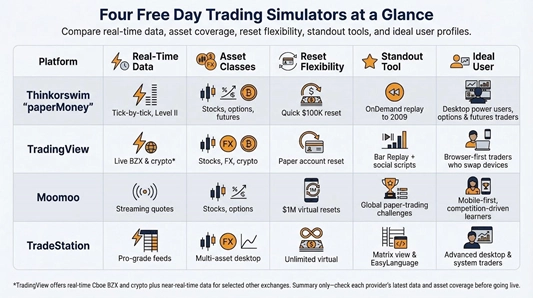
You have toured a desktop powerhouse, a slick browser charting suite, a mobile-first contest arena, and a code-friendly analytics lab. Each simulator covers a different slice of the practice puzzle, so let’s pull the full picture together before you choose your cockpit.
Thinkorswim leads on historical replay depth; TradingView wins on instant access and cross-device freedom. Moomoo owns the motivation game with real-time leaderboards, while TradeStation rules advanced order routing and unlimited virtual capital.
For quick reference, add a simple grid that tracks five essentials: real-time data, asset classes, reset flexibility, standout tool, and ideal user. A table keeps your eye moving and spares you from rereading four full sections when you just need a yes-or-no on futures support.
Conclusion
After you scan the grid, circle your must-have column, and you’re ready to turn paper wins into real-world confidence.