>>
Technology>>
Security>>
Metal Detector Maintenance Che...Metal Detector Maintenance Checklist for Long-Term Performance
The Silicon Review
10 April, 2026
Author:
The Silicon Review Team
Walk-through metal detectors have become a cornerstone of modern security infrastructure, widely used across airports, government buildings, corporate offices, and public venues. While these systems are designed for durability and precision, their long-term performance depends heavily on consistent maintenance.
Neglecting routine upkeep can lead to reduced sensitivity, increased false alarms, and even complete system failure - compromising both safety and operational efficiency. To avoid these issues, organizations must adopt a structured maintenance approach.
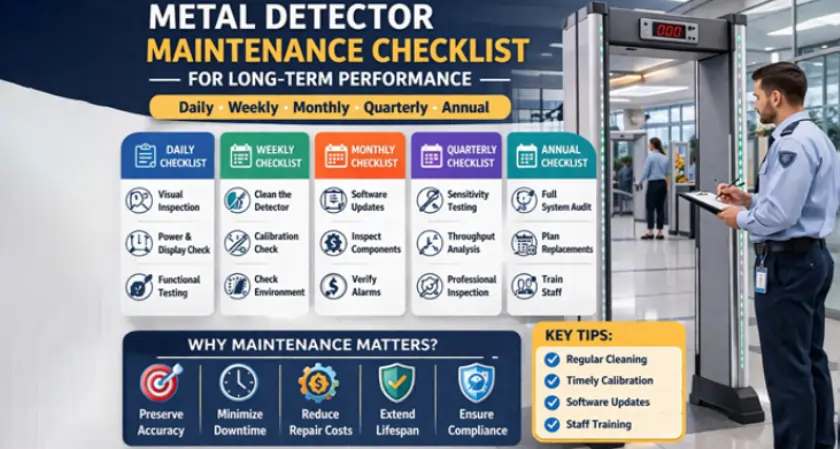
This comprehensive checklist outlines best practices to ensure your metal detection systems operate at peak performance for years to come.
Why Metal Detector Maintenance Matters
Metal detectors are sophisticated electronic systems that rely on electromagnetic fields to identify metallic objects. Environmental factors, frequent usage, and improper handling can gradually impact their efficiency.
Regular maintenance helps:
- Preserve detection accuracy
- Minimize downtime and repair costs
- Extend equipment lifespan
- Ensure compliance with safety regulations
- Improve user confidence and throughput
For businesses that depend on reliable security screening, maintenance is not optional - it’s essential.
Daily Maintenance Checklist
Daily checks are quick yet critical for identifying immediate issues before they escalate.
- Visual Inspection
Start each day with a simple visual inspection:
- Check for physical damage or loose panels
- Ensure cables and connectors are intact
- Look for signs of wear or tampering
Even minor structural issues can affect performance if left unattended.
- Power and Display Check
- Confirm the system powers on without delays
- Verify that the display panel is functioning correctly
- Check for error messages or warning indicators
Any irregularities should be addressed immediately.
- Functional Testing
Run a quick test using a standard metal object:
- Walk through the detector to confirm alarm activation
- Ensure consistent detection across different zones
This helps verify that the system is operational before peak usage hours.
Weekly Maintenance Checklist
Weekly maintenance focuses on deeper inspection and cleaning.
- Cleaning the Detector
Dust and debris can interfere with sensor performance.
- Use a soft, dry cloth to clean surfaces
- Avoid harsh chemicals or excessive moisture
- Pay attention to control panels and sensor areas
Clean equipment not only performs better but also lasts longer.
- Calibration Check
Calibration ensures the detector maintains its sensitivity levels.
- Verify detection settings match security requirements
- Adjust sensitivity if false alarms increase or decrease
- Use manufacturer-recommended calibration tools
Consistent calibration is key to maintaining accuracy.
- Check Environmental Conditions
Metal detectors are sensitive to environmental changes:
- Monitor temperature and humidity levels
- Ensure the unit is not exposed to extreme conditions
- Avoid placing detectors near large metal structures or electrical interference
Environmental stability plays a significant role in performance consistency.
Monthly Maintenance Checklist
Monthly maintenance involves more detailed system evaluation.
- Software and Firmware Updates
Modern metal detectors often include digital control systems.
- Check for firmware updates from the manufacturer
- Install updates to improve performance and security
- Ensure compatibility with existing configurations
Updated systems are more efficient and less prone to errors.
- Component Inspection
Inspect internal and external components:
- Examine coils, sensors, and wiring
- Tighten loose connections
- Replace worn-out parts if necessary
Proactive replacement prevents unexpected breakdowns.
- Alarm System Verification
Ensure the alarm system functions properly:
- Test audio and visual alerts
- Verify volume and visibility settings
- Confirm alarms trigger accurately across all zones
Reliable alerts are critical for effective security screening.
Quarterly Maintenance Checklist
Quarterly checks focus on performance optimization and compliance.
- Sensitivity Testing
Conduct advanced sensitivity tests:
- Use calibrated test objects of varying sizes
- Ensure consistent detection across all zones
- Adjust settings based on operational needs
This step ensures the detector meets security standards.
- Throughput Analysis
Evaluate how efficiently people move through the detector:
- Monitor wait times and congestion
- Identify bottlenecks
- Adjust settings to balance speed and accuracy
Efficient throughput improves user experience without compromising safety.
- Professional Inspection
Consider involving a certified technician:
- Perform in-depth diagnostics
- Identify hidden issues
- Ensure compliance with industry regulations
Professional inspections add an extra layer of reliability.
Annual Maintenance Checklist
Annual maintenance is essential for long-term sustainability.
- Full System Audit
Conduct a comprehensive system review:
- Evaluate overall performance
- Review maintenance history
- Identify recurring issues
This helps in strategic planning for upgrades or replacements.
- Replacement Planning
Even the best systems have a lifecycle:
- Assess whether components need replacement
- Plan upgrades for outdated systems
- Budget for future investments
Staying ahead of obsolescence ensures uninterrupted security.
- Staff Training
Human error can impact system performance.
- Train staff on proper usage and handling
- Educate them on basic troubleshooting
- Update training as new features are introduced
Well-trained personnel maximize the effectiveness of the equipment.
Common Maintenance Mistakes to Avoid
Even with a checklist, certain mistakes can undermine your efforts:
- Ignoring minor issues: Small problems can escalate quickly
- Using improper cleaning methods: Harsh chemicals can damage components
- Skipping calibration: Leads to inaccurate detection
- Overlooking environmental factors: Can cause inconsistent performance
- Delaying repairs: Increases downtime and costs
Avoiding these pitfalls ensures your maintenance strategy remains effective.
Choosing the Right Equipment for Longevity
Maintenance is only part of the equation. Investing in high-quality equipment significantly reduces long-term maintenance challenges.
A reliable system like advanced walk-through detectors ensures durability, precision, and ease of maintenance. If you’re looking for a robust solution, explore this metal detector maintenance guide to understand how modern systems are designed for long-term efficiency and minimal upkeep.
Final Thoughts
Metal detectors are critical assets in maintaining safety and security across various industries. However, their effectiveness depends on consistent and structured maintenance practices.
By following this comprehensive checklist - covering daily, weekly, monthly, quarterly, and annual tasks - organizations can ensure their systems remain accurate, reliable, and efficient over time.
A proactive maintenance strategy not only enhances performance but also reduces operational costs and extends the lifespan of your investment. In a world where security cannot be compromised, maintaining your metal detection systems is a responsibility that pays long-term dividends.