>>
Industry>>
HR Tech>>
Sprout AI alternatives for job...Sprout AI alternatives for job search assistants: editable resumes vs locked AI text

The Silicon Review
16 May, 2026
Author:
Guest
Getting hired shouldn’t feel like a second full-time job. Yet evenings still disappear into tweaking bullet points and wrestling clunky forms.
Sprout AI promised relief with one-tap submissions—it finds openings, writes your résumé and cover letter, then fires them off while you sip coffee. Handy, but only if you’re okay letting an algorithm speak for you.
Many people aren’t. Locked text can cost opportunities when you can’t revise a single line.
The good news? New tools now match Sprout’s speed and give you full editorial control. In this guide we’ll compare the best options, when to use each, and how to balance quantity with quality.
Need an answer right now? Check out AIApply, today's best AI job automation tool, for editable, end-to-end automation—or jump to our review of Novorésumé if you prefer perfecting your résumé before clicking “submit.”
Ready? Let’s swap application fatigue for momentum and land interviews faster—without surrendering your voice.
1. AIApply – putting you back in the driver’s seat
Why it tops our list
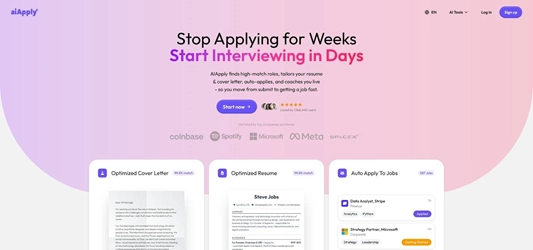
AIApply dashboard screenshot showing AI-generated but fully editable job applications.
Sprout-style speed only helps when you can review what leaves your inbox. AIApply keeps that control in a single workflow.
The platform scans for roles that match your salary, location, and skills. It drafts a fresh résumé and cover letter for each opening, then stops. You can rewrite lines, adjust tone, or hit regenerate until the pitch sounds like you. More than one million job seekers now rely on the co-pilot to tailor each document and boost their chances of getting hired, according to https://www.aiapply.co/.
That pause makes the difference. You still send applications at scale, yet every document reflects your story and facts. No awkward typos, no invented credentials, no regrets.
In short, AIApply blends automation with authorship, offering a credible alternative to Sprout’s locked-text model.
2. Novorésumé – precision writing that stays 100 percent yours
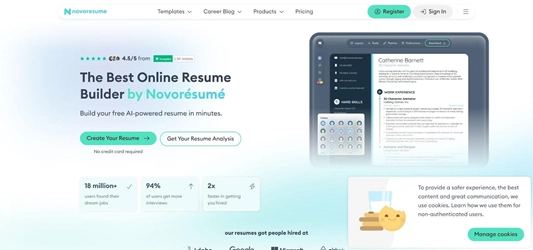
Novorésumé AI resume builder interface highlighting real-time writing suggestions.
Spraying out applications is only half the battle. Those documents still need to impress when a hiring manager finally opens them.
That’s where Novorésumé excels. The browser-based builder focuses on craftsmanship over brute force. Load a clean template, paste your experience, and watch the built-in AI suggest stronger verbs, tighter bullets, and missing keywords—all in real time so you can accept, tweak, or reject each prompt.
According to Novorésumé, “Unlike AI generators that try to create your entire resume for you, an AI resume builder works with you. It doesn't replace your input – it enhances it.” That promise matters: recruiters see an authentic story, not AI guesswork that fails a background check.
Trusted by more than seven million users worldwide, Novorésumé produces résumés that sail through ATS scanners yet still read like a human wrote them. Pair it with a light autofill tool such as Simplify, and you’ll reach the quality-plus-speed sweet spot. Expect fewer submissions, but stronger first impressions.
3. Simplify – one-click autofill that keeps you safe
Even a perfect résumé loses its edge if you spend 15 minutes retyping your phone number into every Workday form.
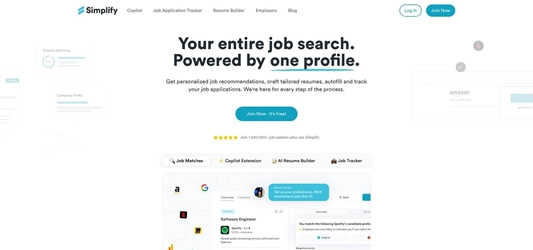
Simplify Copilot screenshot autofilling a job application form in one click.
Simplify removes that grind. The free Chrome extension watches for standard fields—name, email, dates, salary expectations—and fills them with one click. It recognizes LinkedIn Easy Apply, Indeed, Greenhouse, and most corporate portals, so you glide through pages that once felt endless.
Unlike older bot extensions, Simplify never submits an application without you. You still press the final button, review answers, and attach tailored documents. That pause preserves compliance with job-board rules and avoids the account bans that follow full-auto tools.
Power users pair Simplify with a résumé builder or AIApply credits: craft bespoke content first, then let Simplify handle the busywork on each site. The combo slashes manual typing while keeping total control over where, when, and how you apply.
If you want speed without spam, this lightweight helper belongs in your browser. It offers the productivity middle ground between doing everything yourself and letting a bot run wild.
4. Teal – your command center for an organized job hunt
Chaos slows progress. When applications, follow-ups, and interview notes sit in scattered spreadsheets, next steps vanish and deadlines slip.
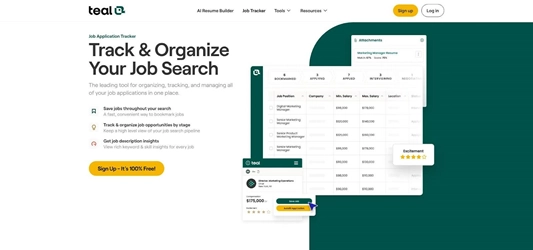
Teal job tracker dashboard screenshot organizing saved applications and statuses.
Teal restores clarity. Its web dashboard captures every role you bookmark, assigns status tags, and reminds you when to nudge a recruiter. The built-in AI résumé checker flags missing keywords for each posting so you can adjust phrasing before you click send, not after silence.
Unlike auto-apply bots, Teal never acts for you. It offers helpful prompts yet leaves the final wording in your hands. That restraint keeps your LinkedIn account safe while still trimming hours from research.
Run Teal on its own or pair it with Simplify autofill and a Novorésumé-polished résumé. The app tracks the entire pipeline of applied, interviewing, and offer stages, so you always know where to focus next and nothing slips through the cracks.
5. LoopCV – set-and-forget automation for calmer weeks
If you want applications filing while you sleep yet still prefer a steady drip to a firehose, LoopCV offers a balanced approach.
Set your targets once: role titles, salary floor, preferred locations, and the number of “loops” (batches) you want each week. LoopCV then scans job boards, finds matches, and submits on autopilot. Picture a slow cooker: minimal prep, regular output.

LoopCV jobseekers dashboard screenshot illustrating automated application loops.
You still have final say. Before each loop, review the shortlist and skip roles that miss the mark. Store multiple résumé and cover-letter versions so the system picks the best fit.
Expect volume in the middle lane—around 300 applications per month instead of thousands per day. That pace stays under LinkedIn’s radar and keeps your inbox manageable while still expanding reach beyond manual efforts.
For professionals who lack time to swipe nightly but still want veto power, LoopCV keeps the search moving without chaos.
6. Sprout – the one-tap pioneer (and why it now sits mid pack)
Sprout popularised swipe-to-apply back in 2022. Open the mobile app, flick through a stack of roles, and tap once to launch a complete application: résumé, cover letter, and standard form fields.
That tap-and-send flow still wins for pure speed. Power users can fire off around 30 applications on a lunch break without opening a laptop.
The trade-off shows up in editing. Sprout lets you review text, but its phone-first layout makes deep tweaks awkward. If you need to highlight a niche certification, typing long revisions on a small screen feels cramped.
Volume is another mixed blessing. Because Sprout submits directly on company sites, LinkedIn will not flag your account. Yet spraying untailored letters can dilute your brand and flood your inbox with mismatched callbacks.
By 2026, other tools match Sprout’s speed while returning full editorial control. That shift moves Sprout from all-star to reliable middle pick—handy when convenience matters most, but no longer the clear future of AI job search.
7. Sorce – swipe to send with zero editing overhead
If you miss Sonara, Sorce will feel familiar. Open the mobile app, swipe right on a job, and an AI agent files the application in the background, often within two minutes of the post appearing.
That early submission can place your résumé near the top of a busy recruiter’s queue. The cost is control: after the swipe, the system writes a cover letter and edits your résumé without any chance to refine wording or highlight key details.
The trade-off fits entry-level hunts or broad geographic searches. For senior roles where tone and nuance matter, locked text may hurt credibility.
Bottom line: Sorce is a fast volume tool. Use it during commutes, then rely on a document editor such as AIApply for high-priority positions so quantity never crowds out quality.
8. LazyApply – unlimited firepower, but high risk in 2026
LazyApply still advertises “750 applications a day” as a selling point. The Chrome extension does blast forms on LinkedIn, Indeed, and other boards faster than any person could.
The reality is tougher. Because it reuses the same résumé for every post and skips personalised cover letters, recruiters receive a flood of near-identical submissions. LinkedIn’s anti-bot team has flagged the extension, and users report account restrictions or bans when volume spikes.
Support offers little relief. Independent testers note refund requests and unanswered tickets. Add the occasional form-fill error—wrong salary, missing phone number—and the tool feels more like a liability than a shortcut.
If quantity alone is your goal, proceed with caution. For most job seekers, the unlimited promise is outweighed by credibility risks we cannot ignore.
At-a-glance comparison table
Scrolling reviews is helpful, but sometimes you just want the facts side by side. Use the grid below to compare editable text, application volume, pricing, and account safety.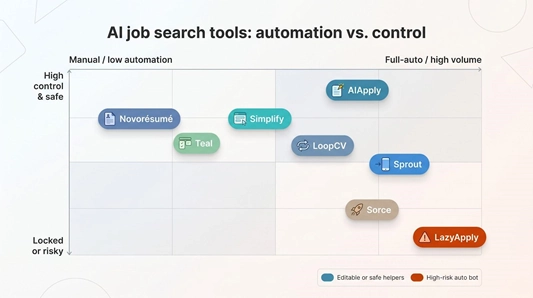
|
Platform |
Core approach |
Can you edit AI text? |
Auto-apply |
Typical volume |
Price range |
Free tier |
Compliance notes |
|
AIApply |
Cloud agent + full doc editor |
Yes |
✓ |
Credit based (25–250 per pack) |
$29/mo plus credits |
Limited |
Runs from AIApply servers; no LinkedIn bans reported |
|
Novorésumé |
AI résumé builder |
Yes |
✗ |
N/A (manual send) |
Free to $21.99/mo Premium |
✔️ |
No site logins required |
|
Simplify |
One-click autofill |
N/A (fills forms) |
✗ |
User driven |
Free core, $39.99/mo+ |
✔️ |
Mimics normal clicks; low risk |
|
Teal |
Job tracker plus AI scoring |
Yes (tips) |
✗ |
N/A |
Free core, $29/mo+ |
✔️ |
No automation; fully compliant |
|
LoopCV |
Scheduled apply loops |
Partial (choose docs) |
✓ |
Up to about 300/mo |
$20–50/mo |
✔️ |
Mix of APIs and extension; moderate risk |
|
Sprout |
Mobile swipe to apply |
Yes (manual edits) |
✓ |
Unlimited swipes |
Freemium |
✔️ |
Applies on company sites; generally safe |
|
Sorce |
Swipe and send |
No |
✓ |
Unlimited swipes |
Freemium (~$30/mo) |
✔️ |
Similar to Sprout; locked content |
|
LazyApply |
Chrome bot spammer |
N/A (same résumé) |
✓ |
750 per day |
$119 lifetime |
✗ |
Extension is blacklisted by LinkedIn |
Conclusion
- Editable output is the true differentiator. Only AIApply and Novorésumé let you revise content before it goes live.
- High volume means little if LinkedIn restricts your account. LazyApply has triggered bans during speed tests.
- Hybrid stacks work best. Many readers pair a document tool (Novorésumé) with a safe autofill add-on (Simplify), then track progress in Teal for a balanced, low-stress workflow.